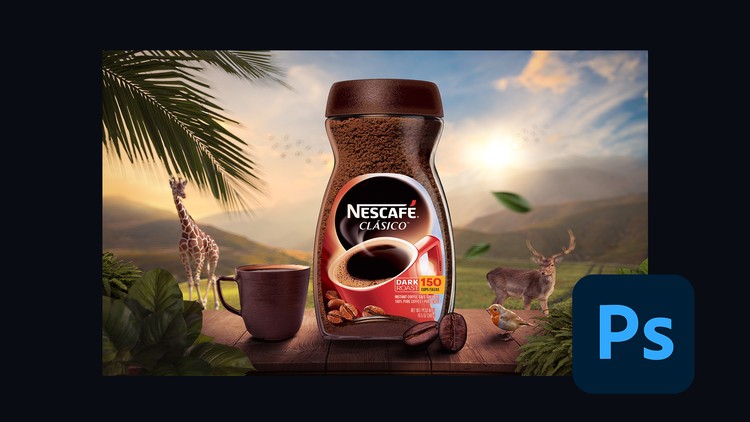
Create a Mesmerizing Nescafe product artwork – Learn Advanced Compositing in Photoshop.
What you will learn
Create mesmerizing product artwork in Photoshop.
Learn color balancing.
Learn advanced compositing.
Learn color grading.
Why take this course?
Welcome to Nescafe Product Advanced Compositing in Adobe Photoshop CC!
Hey there, future Photoshop wizards and creative enthusiasts! Welcome to this exciting free course where you’ll learn how to create stunning, professional-grade product artwork that’s as bold and invigorating as a cup of Nescafe itself. Whether you’re a beginner or a seasoned designer, this course will take your Photoshop skills to the next level. Let’s brew up some creativity together!
Why This Course is Important
In today’s visually-driven world, the ability to create eye-catching product artwork is a game-changer. Whether you’re designing for advertising, social media, or personal projects, advanced compositing skills can help you stand out in a crowded marketplace. By learning how to seamlessly combine multiple images into one cohesive composition, you’ll gain a skill that’s not only creative but also highly practical and in demand. These techniques can be applied to a wide range of industries, making them a valuable addition to your skill set.
What You’ll Learn
This course is packed with hands-on, step-by-step tutorials that will guide you through the process of creating a beautiful Nescafe product artwork in Adobe Photoshop. You’ll learn:
- Advanced Compositing Techniques: Master the art of blending multiple images into one seamless composition, from selecting and masking to lighting and shadow adjustments.
- Creating Realistic Textures and Effects: Learn how to add depth and realism to your artwork with textures, reflections, and lighting effects.
- Color Grading and Finishing Touches: Discover how to enhance your composition with professional color grading and polish it to perfection.
Each lesson is designed to be beginner-friendly yet packed with professional techniques to help you create stunning, high-quality artwork.
Why Learn From Me?
With 9 of experience in graphic design and Adobe Photoshop, I’ve worked on countless projects, from product advertisements to digital art. I’ve also taught thousands of students worldwide, helping them master complex design concepts in a simple and engaging way. My teaching style is practical, focused, and designed to help you achieve real results. When you learn from me, you’re learning from someone who’s passionate about helping you succeed and grow as a designer.
Join the Course Today!
Don’t miss this opportunity to learn advanced compositing techniques for free! Whether you’re looking to enhance your portfolio, impress clients, or simply explore your creativity, this course is your chance to master Adobe Photoshop and create artwork that stands out. Enroll now and start crafting your masterpiece today!
Join the course and let’s create something extraordinary together. Your journey into the world of advanced compositing starts here—let’s make it unforgettable!
- Course Overview
- Industry-Standard Composition Mastery: This curriculum transcends basic photo editing by focusing on the complex world of commercial product visualization. You will engage in a masterclass environment where the primary objective is to build a high-conversion Nescafe advertisement from a blank canvas. This involves understanding how to blend multiple disparate elements into a singular, cohesive, and visually stunning marketing asset that meets modern agency standards.
- 2025 Generative AI Synergy: The course provides an in-depth exploration of how the 2025 Adobe Firefly updates have changed the creative landscape. You will learn to treat AI not just as a shortcut, but as a collaborative partner for generating custom background textures, extending canvases with perfect continuity, and creating unique environmental reflections that were previously impossible to simulate manually.
- Commercial Storytelling through Pixels: Beyond the technicalities, the course emphasizes the “why” behind the “how.” You will learn the psychological impact of product placement, the use of leading lines to draw the viewer’s eye toward the brand logo, and the art of creating “visual hunger” through high-end texture enhancement of liquids, steam, and packaging.
- Advanced Spatial Logic: A significant portion of the course is dedicated to mastering perspective and depth. You will learn to align the horizon lines of various stock images and generated assets to ensure that every element in your Nescafe artwork occupies a realistic three-dimensional space, preventing the “flat” look that plagues amateur compositions.
- Requirements / Prerequisites
- Intermediate Software Foundations: While the course is comprehensive, students should possess a functional understanding of the Photoshop interface, including the ability to navigate panels, use basic brushes, and understand the core concept of layers and non-destructive editing.
- Optimized Hardware Specifications: Due to the heavy reliance on the 2025 AI features and Neural Filters, a computer with a dedicated GPU and at least 16GB of RAM is highly recommended. This ensures that the Generative Fill and complex rendering tasks do not cause system bottlenecks or software crashes during the project.
- Active Creative Cloud Subscription: Access to a legitimate Adobe Creative Cloud account is essential, as the course utilizes cloud-based AI processing and the latest version of Photoshop CC 2025 to access the most recent feature set and tool improvements.
- Conceptual Patience and Precision: High-end compositing is a meticulous process. Students are expected to bring a detail-oriented mindset, as the realism of the final product depends on micro-adjustments in lighting, shadow density, and edge refinement that can take time to perfect.
- Skills Covered / Tools Used
- Dynamic Lighting and Shadow Casting: You will master the use of the “Match Color” tool alongside manual Curves adjustments to ensure that the lighting on the Nescafe product perfectly mirrors the environmental light source. You will also learn to create “contact shadows” and “cast shadows” using a combination of Gaussian Blur and Motion Blur for hyper-realism.
- Precision Masking with Select and Mask: Go beyond the Pen Tool by utilizing the Refine Edge Brush and Object Selection Tool for complex extractions, specifically focusing on difficult edges like steam, condensation, and fine product details, ensuring a clean transition between the product and its new environment.
- Atmospheric Effects and Depth of Field: Learn to use the Depth Map feature and Field Blur to simulate a professional camera lens. You will also master the creation of atmospheric elements like floating coffee beans, dust motes, and steam using custom brushes and blending modes like Screen and Linear Dodge (Add).
- Advanced Camera Raw as a Filter: Discover how to use Camera Raw for the final “grading” of the composite. This includes using the Color Mixer, Texture, and Dehaze sliders to unify the color palette of the entire image, giving it a professional, cinematic look that feels like a single photograph.
- Non-Destructive Smart Object Workflows: Every step of the course emphasizes the use of Smart Objects and Smart Filters. This ensures that you can always go back and tweak the intensity of an effect or swap out an asset without losing any of your previous work, a vital skill in a professional client-service environment.
- Benefits / Outcomes
- High-Value Portfolio Asset: Upon completion, you will have a professional-grade commercial artwork featuring a global brand. This piece will demonstrate your ability to handle complex light, shadow, and AI integration, making it a standout addition to any digital artist’s portfolio or Behance profile.
- Ad-Agency Level Efficiency: By learning how to bridge the gap between traditional manipulation and AI-assisted generation, you will be able to complete complex projects in half the time it would take using old-school methods. This efficiency is highly valued in fast-paced marketing and design agencies.
- Mastery of Visual Consistency: You will gain the ability to take several unrelated images and make them look as though they were shot in the same photo studio. This skill of “visual unification” is the hallmark of an advanced Photoshop user and is applicable to everything from web design to film poster creation.
- Future-Proofing Your Career: As AI becomes more integrated into the creative industries, this course equips you with the specific knowledge of how to steer these tools effectively, ensuring you remain a relevant and highly skilled professional in the 2025 design landscape and beyond.
- PROS
- Highly Relevant for 2025: The course focuses specifically on the most current version of Photoshop, ensuring that no time is wasted on outdated tools or legacy workflows.
- Project-Based Learning: Instead of learning tools in isolation, you learn them by applying them to a real-world scenario, which significantly improves knowledge retention and practical application.
- Technique Versatility: The methods taught for the Nescafe project are universal; they can be applied to any product photography, from tech gadgets to luxury cosmetics.
- CONS
- Intensity for Novices: The rapid pace and focus on complex compositing may feel overwhelming for absolute beginners who have never opened the software before, as it skips foundational basics in favor of high-level professional techniques.