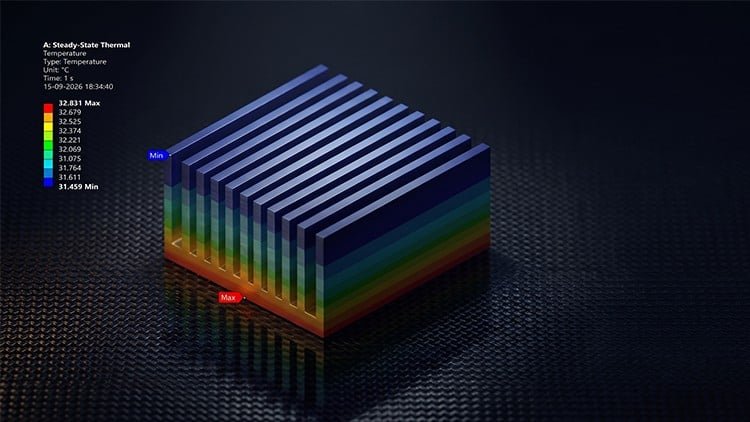
Learn FEA from Beginner to Advanced with DesignModeler, Meshing, Structural, Vibration & Thermal Analysis
What You Will Learn:
- ANSYS Workbench 2026 R1 interface and simulation workflow
- ANSYS DesignModeler for sketching and geometry creation
- Create solid, line, and surface bodies for FEA
- Define and assign material properties using Engineering Data
- Generate and optimize FEA meshes using global and local controls
- Apply loads, supports, and boundary conditions in ANSYS Mechanical
- Perform Static Structural Analysis and evaluate stress and deformation
- Perform Fatigue Life and Eigenvalue Buckling Analysis
- Show more
Overview
So, you’re looking to dive deep into the world of Finite Element Analysis (FEA) using ANSYS Workbench? Good call. From what I’ve seen, ‘ANSYS Workbench 2026 R1: Master FEA & Engineering Analysis’ isn’t just another ‘click-this-button’ tutorial. It genuinely positions itself as a robust, beginner to advanced pathway for anyone serious about mastering simulation. This isn’t just about memorizing steps; it’s about building a foundational understanding of the entire FEA workflow – from sketching geometries in DesignModeler and defining material properties, to generating optimal meshes and interpreting complex results from Static Structural, Vibration, and Thermal Analysis. They also cover specialized analyses like Fatigue Life and Eigenvalue Buckling, which are critical for robust product design. This isn’t just theory; it’s about getting hands-on labs experience with an industry-standard tool that’s crucial for modern product development. Expect a structured journey through the core functionalities that engineers actually use daily, ensuring your skills are immediately relevant with the latest R1 release.
Prerequisites
Let’s be real here: while the course aims for beginner to advanced, a complete novice in engineering might struggle with the ‘why’ behind certain analyses. You absolutely need a solid grasp of fundamental engineering mechanics, material science, and possibly some basic calculus or linear algebra – not necessarily to solve equations by hand, but to truly understand what the software is doing under the hood and interpret results critically. Experience with any CAD software, even something rudimentary, will give you a significant leg up when tackling geometry creation in ANSYS DesignModeler. It’s not strictly mandatory, but it’ll smooth out that initial learning curve significantly, letting you focus more on the FEA concepts rather than basic modeling.
Skills & Tools
Upon completion of this program, you’re not just a software user; you’re a practitioner equipped with valuable job-ready skills. You’ll gain practical proficiency in the latest ANSYS Workbench 2026 R1 interface, mastering the full simulation workflow. This includes becoming adept at:
- Creating and modifying complex geometries using ANSYS DesignModeler, covering solid, line, and surface bodies.
- Defining and applying appropriate material properties via Engineering Data.
- Generating high-quality, optimized FEA meshes using both global and local controls.
- Applying diverse loads, supports, and boundary conditions effectively within ANSYS Mechanical.
- Performing and critically interpreting results from various analyses: Static Structural Analysis (stress, deformation), Fatigue Life, Eigenvalue Buckling Analysis, Vibration Analysis (modal analysis), and Thermal Analysis.
These are the foundational and advanced techniques that directly translate to practical engineering problem-solving.
Career Benefits & Job Roles
Mastering ANSYS Workbench with this depth opens up significant opportunities for career growth. For mechanical engineers, aerospace engineers, product designers, and R&D professionals, these skills are increasingly non-negotiable. You’ll be equipped to tackle complex real-world projects involving product design validation, optimization, and failure analysis across various industries. This comprehensive course provides an excellent foundation for a range of specialized roles such as:
- FEA Analyst
- Simulation Engineer
- Design Engineer (with a simulation specialization)
- Product Development Engineer
- R&D Engineer
Furthermore, the structured and detailed nature of the content can serve as solid certification prep for those looking to formally validate their ANSYS expertise, making you a highly competitive candidate in a demanding job market.
Pros
Alright, let’s talk about what genuinely stands out in this course:
- Comprehensive, Practical Coverage: This isn’t just a surface-level overview. The course genuinely covers the breadth of ANSYS Workbench functionalities, from geometry creation in DesignModeler to advanced analyses like Fatigue Life and Eigenvalue Buckling. It feels like a genuine attempt to build a robust skill set for tackling real-world projects, rather than just showcasing features. The emphasis on global and local meshing controls, for instance, is crucial for anyone serious about getting accurate results.
- Up-to-Date Software Version: Using ANSYS Workbench 2026 R1 is a big win. You’re learning on the most current software iteration, meaning the interface, features, and workflows are immediately relevant to what you’ll encounter in an industrial setting. There’s no wasted time trying to translate outdated instructions to a newer version, which is a common frustration with older courses.
- Structured Learning Path (Beginner to Advanced): The progression is thoughtfully laid out. Starting with the basics of the interface and geometry, then moving into materials, meshing, and finally diverse analysis types, ensures a logical and digestible learning curve. It truly attempts to cater to learners across the beginner to advanced spectrum without overwhelming them early on, building confidence step-by-step.
- Focus on Workflow and Interpretation: Beyond just showing *how* to click, the course seems to emphasize the *why* behind each step and, critically, how to interpret the results accurately. This analytical approach is vital for any effective FEA engineer and helps bridge the gap between software proficiency and true engineering insight, which is often overlooked in other tutorials.
Cons
If I had to pick one area for constructive feedback, it would be that while the course provides excellent foundational and intermediate hands-on labs, achieving true mastery for highly specialized industrial applications might require additional self-study or access to more advanced, very specific case studies beyond the core curriculum. It’s a fantastic springboard, but don’t expect it to instantly replace years of diverse project experience. A little more emphasis on troubleshooting common simulation errors and best practices for debugging complex models might also be highly beneficial for those truly entering the field.