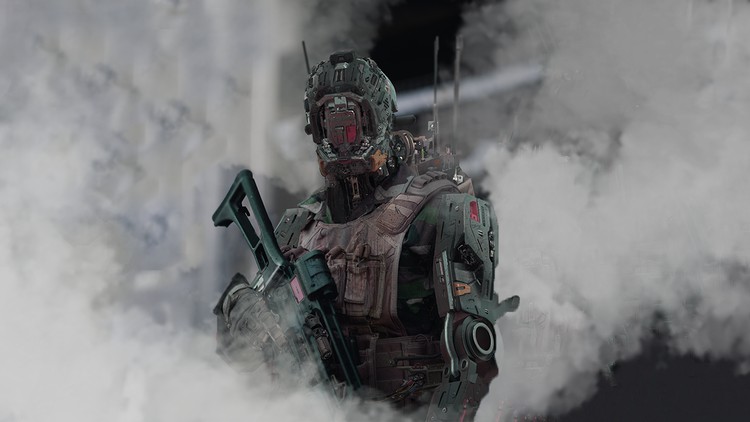
photobashing techniques, 3d, rendering realistic images, hardsurface
What you will learn
designing robot character concept art for film and game
3d sculpting with zbrush
industry standard for concept art to become concept artist for film and game
photo-bashing techniques with photoshop
Why take this course?
🚀 Course Title: Robot Design: The Ultimate Concept Art Tutorial
🎓 Course Headline: Master Photobashing Techniques for 3D and Rendering Realistic Images in Hardsurface Design!
Are you ready to dive into the world of concept art and emerge as a top-tier designer for the film and game industries? If your answer is a resounding “Yes!” then Robot Design: The Ultimate Concept Art Tutorial is the perfect course for you! 🤖✨
As a seasoned concept artist with extensive experience in designing robots using 3D and photobashing techniques, I am thrilled to share all my industry secrets with you. This high-quality training course is packed with over 6 hours of content, tailored to enhance your skills and elevate your artistry to new heights.
What You’ll Learn:
- Stormbrain Ideas: Prepare captivating concepts for your characters that stand out in the creative world. 🌩️💡
- Perfect Image Selection: Discover how to choose the ideal images to inspire your designs and inform your artistic decisions. 🖼️🎯
- Analyzing Light: Learn the art of capturing light in your artwork, which is crucial for creating a realistic look. ☀️🌟
- 3D Sculpting Hard Surfaces: Gain expertise in sculpting detailed hard-surface elements that are fundamental in concept art. 🛠️🌫️
- Kitbash Application: Speed up your workflow by efficiently combining existing assets to create new, unique designs. 🔨➕
- Using Alphas for Detailing: Master the use of alphas to add fine details that give your designs a polished and finished look. 🖌️🔍
- Working with Less Geometry: Learn how to export your design while maintaining a low-poly count, ensuring optimal performance in final applications. 📦🚀
- Rendering Materials Layers in Keyshot: Discover the step-by-step process for rendering complex materials using Keyshot’s layering system. 🎨🖥️
- Photobashing Techniques: Add intricate details to your model and complete your design with advanced photobashing methods. 📸🎨
- Adding Decals to Your Model: Make your design look like it’s a real, manufactured object by strategically placing decals. ✅🏗️
- Weathering Your Model: Add textures and wear to your model to give it a realistic, well-lived-in feel. 🌧️💪
- Adding Effects Like Smoke: Enhance your design with dynamic effects that bring your robot to life. 🔥⚛️
Tools You’ll Work With:
- Zbrush: Sculpt high-detail models and refine your designs. 🌟🎨
- Keyshot: Learn to render stunning, photorealistic images. 🖼️☁️
- Photoshop: Edit and manipulate images to complete your concept art. 🖺️💻
- …and many other tools that are essential for a concept artist! 🛠️🔗
Prerequisites:
This course requires basic knowledge of Zbrush, Keyshot, and Photoshop. However, even beginners will find it easy to follow along with the tutorials. Plus, you’ll get bonus materials to kickstart your project, including 6 photoshop shape squares for hard surface, 8 high kitbash pieces for Zbrush, and 10 alphas for any hard-surface project you undertake! 🎁🎉
Join me on this exciting journey to become the concept artist you’ve always aspired to be. I can’t wait to see the incredible robots you’ll create! 🤝🌟
Enroll now and let’s embark on this creative adventure together! 🚀🎨👨🎨🤖
Alright, let’s talk shop. I’ve been kicking around the digital art and design trenches for a while now, seeing trends come and go, and one thing’s for sure: the concept art game is tougher and more demanding than ever. Speed, quality, and adaptability are king. So, when I stumbled upon ‘Robot Design: The Ultimate Concept Art Tutorials,’ my seasoned cynicism was on high alert. Could it really deliver on “ultimate”? After putting in the hours, I’m genuinely impressed. This isn’t some fluffy overview; it’s a deep dive into a modern, efficient workflow that’s frankly essential for anyone serious about carving out a niche in film and game production.
Overview
Forget the old-school, purely 2D approach to concept art if you’re designing complex mechanical characters. This course isn’t just about drawing cool robots; it’s about integrating a powerful, iterative pipeline that leverages the strengths of both 3D and 2D. What really sets it apart is its holistic approach to design *thinking*. It’s not merely a series of technical demonstrations; it guides you through the process of problem-solving, making aesthetic choices, and quickly iterating on complex hard-surface forms. You learn how to translate a vague brief into a functional, visually compelling robot that can be handed off to a 3D modeler with confidence. It’s about building a robust framework for your designs, ensuring they have structural integrity and a clear sense of purpose, not just cool aesthetics. This focus on practical application and pipeline efficiency is what truly elevates it beyond typical art tutorials.
Prerequisites
While the course structure guides you effectively, don’t walk into this expecting to be held by the hand if you’ve never touched a digital brush or sculpted a primitive in ZBrush. I’d say a solid foundation in digital painting (understanding layers, masks, blending modes in Photoshop) is highly beneficial. For ZBrush, some basic familiarity with the interface and navigation will save you headaches, though the instructor does a commendable job breaking down the robot-specific sculpting techniques. It’s not necessarily for a complete novice to *all* digital art, but rather for those looking to level up from a basic to an advanced concept art workflow. If you’re coming from a traditional art background, you’ll pick up the software faster if you’ve already got a grip on anatomy, perspective, and composition. This course is about accelerating your *existing* artistic skills into a professional digital pipeline.
Skills & Tools
Prepare to get intimately familiar with some serious industry-standard tools. The primary players here are ZBrush for 3D sculpting and Photoshop for advanced photo-bashing techniques and final rendering. You’ll learn how to leverage ZBrush’s powerful modeling capabilities to rapidly block out intricate hard-surface robot components, focusing on form, function, and silhouette. The course then expertly transitions into using these 3D foundations as a base for highly realistic 2D renderings. Expect to master advanced techniques for blending photographic elements, painting details, managing light and shadow, and achieving that ‘cinematic’ look for your robot character concepts. This isn’t just about using tools; it’s about understanding *why* and *when* to use them in an integrated workflow, preparing you for real-world projects where speed and quality are paramount. You’ll develop strong skills in visual storytelling through mechanical design, composition, and effective rendering.
Career Benefits & Job Roles
This isn’t just a fun art course; it’s a strategic investment in your career growth. The techniques taught here provide direct, job-ready skills for several high-demand roles. You’ll be well-prepared to step into positions as a Concept Artist for AAA game studios or major film productions, specializing in character and mechanical design. The focus on efficiency and integrating 3D workflow makes you a highly valuable asset, as many studios now expect this hybrid approach. You could also pursue roles as a Hard Surface Designer or Vehicle/Prop Concept Artist. The skills learned are directly applicable to building a portfolio that demonstrates not just artistic talent, but also an understanding of modern production pipelines, which is a massive differentiator in a competitive market. It arms you with the practical knowledge that often takes years to accumulate on the job, essentially fast-tracking your entry into professional concept art.
Pros
- Comprehensive Hybrid Workflow: This course expertly teaches a modern 3D-to-2D pipeline using ZBrush and Photoshop, which is absolutely critical for efficient, high-quality concept art in today’s industry. It’s not just theory; it’s a practical, step-by-step implementation.
- Focus on Industry-Standard Tools & Techniques: You’re not learning obscure software here. Mastering ZBrush for hard-surface sculpting and advanced photo-bashing in Photoshop directly equips you with industry-standard tools and processes used in top studios. This significantly boosts your marketability.
- Practical, Job-Ready Skills: The course emphasizes creating high-fidelity, production-ready concepts, directly providing job-ready skills that employers are actively looking for. The techniques covered are immediately applicable to real-world projects, making your portfolio stand out.
- Deep Dive into Design Philosophy: Beyond the software, the instructor offers valuable insights into the fundamental principles of robotic design, form language, and visual storytelling, helping you create designs that are not just cool-looking but also believable and functional.
Cons
- Steep Learning Curve for True Beginners: While the instruction is excellent, individuals with absolutely zero prior experience in either ZBrush or advanced Photoshop techniques might find the pace demanding. It’s definitely not a magic bullet for someone without *any* prior digital art foundation; a basic understanding of at least one of the primary tools would be beneficial to keep up with the flow of information.
So, final thoughts? If you’re serious about becoming a professional robot concept artist, or any concept artist dealing with complex hard-surface designs for film and games, this course is an absolute must-take. It provides the kind of practical, pipeline-focused education that’s hard to find and invaluable for career growth. It’s a challenging but incredibly rewarding experience that will undoubtedly elevate your skill set from a foundational understanding to an advanced, industry-relevant application. Stop messing around with outdated techniques and invest in the workflow that will actually get you hired. Highly recommended.