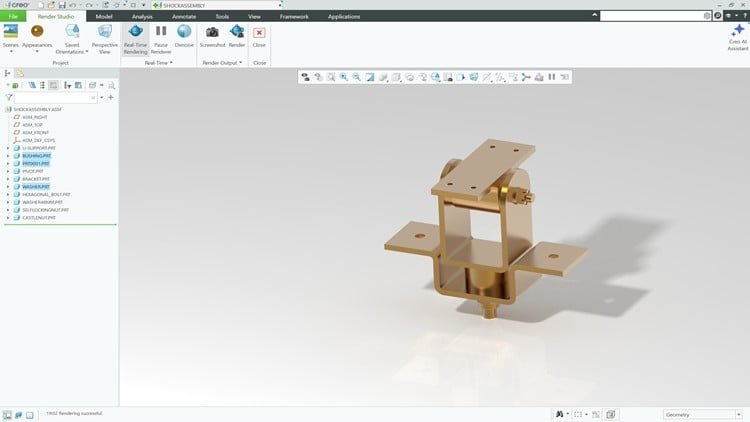
Master Creo Parametric 12 with 3D CAD Design, Sketching, Modeling, Assemblies & Drawings via Hands-on Projects
What You Will Learn:
- Create precise 2D sketches with constraints, dimensions, and design intent
- Master Creo Parametric 12 (Creo Parametric 2026) interface, tools, and workflows from beginner to advanced
- Build 3D models using extrude, revolve, sweep, blend, and advanced features
- Apply feature-based and parametric modeling techniques for real-world design
- Use datums, patterns, mirrors, and advanced modeling tools efficiently
- Design and manage complex assemblies with proper constraints and relationships
- Generate professional 2D engineering drawings, views, dimensions, and BOMs
- Work with surface modeling and advanced part design tools
- Understand industry workflows for mechanical and product design projects
- Complete hands-on exercises, tutorials, and real-world CAD projects
The Reality of Mastering Creo Parametric 12
If you have spent any time in the mechanical engineering or product design world, you know that Creo Parametric is the “heavy lifter” of the CAD industry. While other programs might be more intuitive for a hobbyist, Creo is what the big players—think aerospace, automotive, and heavy machinery—rely on. This course, ‘Creo Parametric 12: 3D CAD Tutorials, Exercises & Projects,’ doesn’t just treat the software like a drawing tool; it treats it like the professional industry-standard tool it is. From my perspective as someone who has navigated the shift from legacy systems to modern PLM environments, this course hits the sweet spot between academic theory and the grit of real-world projects.
What sets this particular curriculum apart is its focus on “Design Intent.” In the professional world, it isn’t enough to just make a 3D model that looks right; the model has to be robust enough to handle changes without “exploding” the feature tree. This course hammers home the parametric modeling logic that separates the amateurs from the pros. It takes you through a beginner to advanced journey that feels less like a series of dry lectures and more like a structured certification prep bootcamp.
Prerequisites for Success
You don’t need a Master’s degree in Engineering to get started here, but you do need a certain mindset. This course is designed for:
- Aspiring Engineers and Students: Those who want to build job-ready skills before they even hit the interview circuit.
- Switchers: Professionals moving from SolidWorks, AutoCAD, or Inventor who need to understand the specific “Creo way” of doing things.
- Basic PC Literacy: You should be comfortable managing files and navigating complex software interfaces.
- Hardware: Ensure you have a machine that meets the minimum specs for Creo Parametric 12 (2026-ready), as 3D rendering and assembly management are resource-heavy tasks.
The Toolkit: Skills & Technical Mastery
The course is remarkably comprehensive, covering the full spectrum of the mechanical design lifecycle. You start with the foundations—mastering the 2D Sketcher. While sketching sounds basic, the course emphasizes constraints and dimensions, which are the DNA of any parametric model. From there, you move into the “meat” of the software: extrude, revolve, sweep, and blend.
The real value, however, lies in the advanced modeling tools. You will dive into surface modeling, which is essential for consumer product design where aesthetics meet engineering. You also get deep-dive hands-on labs on assembly management. Learning how to properly constrain a 50-part assembly so that it moves realistically is a skill that will save you hundreds of hours in a professional setting. Finally, the course closes the loop with professional 2D engineering drawings and BOM (Bill of Materials) generation—the actual documents that a factory needs to build your designs.
Career Benefits & Professional Job Roles
Investing time in this course is a direct play for career growth. In the current market, “CAD Drafter” is a disappearing role, replaced by “Design Engineer” or “Product Development Specialist.” By mastering these industry-standard tools, you position yourself for high-paying roles such as:
- Mechanical Design Engineer: Leading the development of complex machinery and parts.
- Product Designer: Bridging the gap between industrial design and manufacturing reality.
- Tooling & Die Designer: Creating the molds and fixtures used in mass production.
- CAD Manager: Overseeing the workflows and standards for entire engineering departments.
Because the course emphasizes industry workflows, you aren’t just learning buttons; you are learning how to work within a team. This makes you “plug-and-play” for companies that utilize Product Lifecycle Management (PLM) systems.
The Pros: Why This Course Works
- Project-Based Learning: I’m a firm believer that you don’t learn CAD by watching; you learn by doing. The hands-on exercises and real-world CAD projects ensure that the information actually sticks.
- Up-to-Date Content: Focusing on Creo Parametric 12 (2026) ensures you are learning the latest UI improvements and multi-body design workflows that older courses simply don’t cover.
- Logical Progression: The transition from beginner to advanced is seamless. It doesn’t throw you into the deep end of surface modeling before you’ve mastered the basics of datums and patterns.
- Focus on DFM: The course touches on Design for Manufacturing principles, ensuring that what you model in 3D can actually be built in the physical world.
The Cons: An Honest Critique
If I have one gripe, it’s that Creo Parametric itself has a notoriously steep learning curve compared to “fresher” CAD tools. While the course does an admirable job of demystifying the interface, the sheer density of the software can feel overwhelming in the middle sections. You will likely need to pause and re-watch the complex assembly and advanced surfacing modules several times to truly grasp the logic. This isn’t necessarily a fault of the course, but rather the nature of the beast that is high-end 3D CAD design.