Design Stylish TShirt Photoshop With Adobe Photoshop CC and Learn How To Earn Money By T-Shirt Design
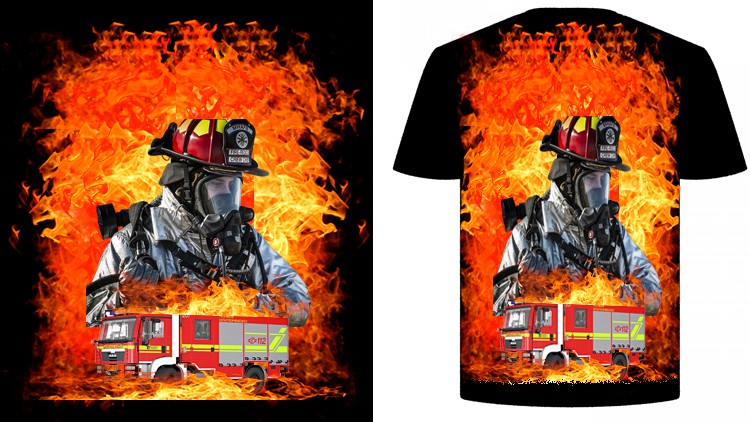
☑ How to design a colorful fire fighter t-shirt
☑ How to design a Hero Soldier t-shirt with green army color
☑ How to design a pure black and white Wanted t-shirt
☑ How to design a lumberjack t-shirt with only use of elements
In this course you will learn How to create or design your own custom T-Shirt In Photoshop. This course is for Intermediate skill levels, so you will find this course easy to follow if you have basic photoshop knowledge. You will learn how to design a fire fighter tshirt, how to design hero soldier or I’d rather die like a man than live like a coward tagline design, how to design a wanted black and white tshirt, how design a lumberjack tshirt using only with elements. You will have class project for every lessons, so once you will learn a lesson you will have to do class project so than you will have practice during learning.
What This Course Includes:
· Free T-Shirt Mock up
· Complete PSD File
· Life-Time Access
· Support From Me
· Free Design Graphics and Elements
· New Updates Often
So once you will complete this course you will be able to design a t-shirt in Adobe Photoshop CC and you will now the sites in where you can sell the design of your t-shirt. Let me clear you one things that once you complete this course you will be able to upload or create gigs on fiverr for selling your tshirt as well as you will learn how to sell tshirt design in teespring. So this tshirt design masterclass is perfect for you if you want to learn t-shirt designing.
English
Language
Introduction
Introduction
Exercise File
Class Project Word File
T-Shirt Design In Photoshop
Need Help? Have Question During Learning?
Fire Fighter T-Shirt Design
Class Project – 1
Hero Soldier T-Shirt Design
Class Project – 2
Wanted T-Shirt Design
Class Project – 3
Lumberjack T-Shirt Design
Class Project – 4
Typography T-Shirt Design
Earn Money With T-Shirt Design
Alright, fellow creatives and aspiring entrepreneurs, let’s talk about the T-Shirt Design Masterclass In Photoshop | Sell Your T-Shirt course. I recently dove into this one, looking to sharpen my Photoshop skills specifically for the print-on-demand (POD) and e-commerce merch space. As someone who’s been in the tech trenches for a while, I’m always on the lookout for training that’s practical, delivers real-world value, and doesn’t just feed you fluff. This course promises to take you from zero to marketable t-shirt designer, and I’m here to give you the lowdown.
Overview
What sets this masterclass apart is its laser focus on creating designs specifically with the intention of selling them. It’s not just about pretty pictures; it’s about understanding what makes a t-shirt design commercially viable. While the listed topics give you a glimpse into the types of designs you’ll learn to create – think bold, thematic graphics for specific niches – the underlying principles taught are transferable. The instructor walks you through the entire workflow, from conceptualization and ideation to the nitty-gritty of preparing files for printing and listing them on platforms. It’s a surprisingly comprehensive journey that aims to equip you with a tangible skill set that can translate into income. The emphasis on understanding your target audience and designing *for* them is a crucial element that often gets overlooked in more general design courses. This is where the “sell your t-shirt” aspect really shines through.
Prerequisites
- A functional computer capable of running Adobe Photoshop.
- A subscription to Adobe Photoshop (or access to a student version).
- A creative mindset and a willingness to learn.
- No prior Photoshop experience is strictly required, but a basic familiarity with computer interfaces will definitely speed things up.
Skills & Tools
The primary tool, as you’d expect, is Adobe Photoshop. This course leans heavily into its various features, from basic layer manipulation and selection tools to more advanced techniques like using brushes, blending modes, and smart objects for scalable design elements. You’ll also touch upon understanding resolution, file formats (like PNG with transparency), and color modes crucial for print production. Think of it as getting hands-on labs within Photoshop, simulating real-world design challenges. While the course is Photoshop-centric, the design principles you’ll absorb are transferable to other graphic design software if you choose to branch out later. The skills you gain here are directly applicable to industry-standard tools used in graphic design and digital art.
Career Benefits & Job Roles
This masterclass can be a significant stepping stone for career growth. For aspiring graphic designers, it adds a specialized, in-demand skill to their portfolio. You could be looking at roles such as:
- Freelance T-Shirt Designer
- Print-on-Demand (POD) Artist
- Merchandise Designer for Brands
- Graphic Designer with a Specialization in Apparel
Pros
- Actionable, Revenue-Focused Curriculum: The course consistently ties design techniques back to the goal of selling t-shirts, which is incredibly motivating and practical for aspiring entrepreneurs.
- Clear, Step-by-Step Instruction: The instructor breaks down complex Photoshop features and design processes into digestible steps, making it accessible even for relative beginners.
- Diverse Design Examples: The variety of t-shirt themes covered provides a broad understanding of how to adapt design styles for different niches, fostering versatility.
- Focus on Print-Readiness: Crucial technical aspects like file preparation for printing are addressed, saving you potential headaches down the line.
Cons
The primary drawback is that the course is heavily focused on Photoshop and doesn’t delve into other critical aspects of running a POD business, such as market research, keyword optimization for listings, or marketing strategies. While it equips you with excellent design skills, you’ll need to seek out additional resources for the business side of things to truly maximize your selling potential. It’s a powerful design tool, but not a complete business blueprint.