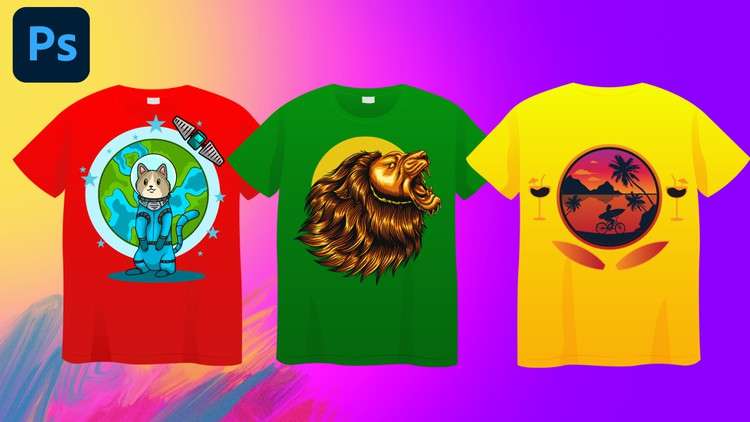
Create Eye-Catching T-Shirt Designs with Photoshop: From Beginner to Pro
What you will learn
Introduction to T-Shirt Design
Photoshop Essentials
Design Principles and Elements
Creating Custom Graphics
Text and Typography Mastery
Advanced Techniques
Mockups and Presentation
Printing and Production Considerations
Building Your Portfolio
Description
This comprehensive T-shirt design course will transform you from a complete beginner to a confident expert in creating eye-catching and professional T-shirt designs using Adobe Photoshop. Whether you’re passionate about fashion, have a knack for creativity, or simply want to learn a valuable skill, this course will equip you with the knowledge and tools to turn your ideas into stunning T-shirt designs that are ready for production.
What You’ll Learn
- Master the Fundamentals of Photoshop: Gain a solid understanding of the essential tools, features, and techniques of Adobe Photoshop, the industry-standard software for creating and editing digital images.
- Explore T-Shirt Design Principles: Delve into the principles of effective T-shirt design, from conceptualizing ideas and sketching layouts to selecting colors, fonts, and graphics that resonate with your target audience.
- Create Captivating T-Shirt Designs: Learn how to utilize Photoshop’s powerful tools to create a variety of T-shirt designs, including text-based designs, graphic designs, and photo-based designs.
- Master Advanced T-Shirt Design Techniques: Elevate your skills with advanced techniques such as image manipulation, layer masking, blending modes, and non-destructive editing workflows.
- Prepare Your Designs for Production: Discover how to export your designs in the correct format and resolution for various printing methods, ensuring your designs look their best on printed T-shirts.
Course Requirements
This course is designed for individuals with a basic understanding of computers and an interest in T-shirt design. No prior Photoshop experience is required.
Who Should Take This Course
- Beginners eager to learn the art of T-shirt design with Adobe Photoshop
- Aspiring T-shirt designers seeking to build a portfolio of professional-looking designs
- Entrepreneurs looking to create and sell their own custom T-shirt designs
- Anyone interested in expressing their creativity and turning their ideas into tangible products
Course Structure
The course is structured around a series of in-depth modules, each covering a specific aspect of T-shirt design and Photoshop usage. Each module includes a combination of video lectures, hands-on exercises, and practical projects to reinforce your learning and ensure you gain hands-on experience applying the concepts.
Course Benefits
- Develop essential T-shirt design skills and techniques
- Create a portfolio of professional-looking T-shirt designs
- Gain the ability to design and produce your own custom T-shirts
- Enhance your career prospects in the T-shirt design industry
Enroll today and unleash your creativity to design T-shirts that make a statement!
Content
Introduction
Overview
Alright, let’s be straight. When I first saw a course promising to take someone from “beginner to expert” in T-shirt design using Photoshop, I had my doubts. Most often, these programs either skim the surface or drown you in technical jargon without practical application. However, I’ve got to hand it to this one: it delivers on its promise. This isn’t just a tutorial series on Photoshop features; it’s a comprehensive curriculum that genuinely aims to transform a novice into someone capable of producing truly professional-grade apparel graphics. It’s a fantastic blend of artistic fundamentals, design principles, and hardcore Photoshop mechanics, all geared towards a specific, highly marketable outcome. You’re not just learning how to use an industry-standard tool; you’re learning how to *think* like an apparel designer, then translate that vision into a tangible, print-ready product. The journey from initial concept to a final, polished design is incredibly well-structured, bridging the gap from absolute beginner to advanced techniques with surprising grace. It focuses heavily on making your designs marketable and print-ready, moving beyond just ‘making pretty pictures’ to creating actual sellable assets.
Prerequisites
While the course boldly states “beginner to expert,” let’s set some realistic expectations. You don’t need prior design experience – that much is true. However, having Adobe Photoshop already installed and a basic familiarity with navigating your computer’s operating system will save you a lot of initial fumbling. Ideally, you’ll have a computer that can run Photoshop without constantly chugging. While a drawing tablet isn’t a strict requirement, if you’re serious about creating custom graphics, it will significantly enhance your workflow and creative freedom down the line. But for getting started, a mouse and keyboard are perfectly adequate. Come with an open mind and a willingness to learn, and you’re good to go.
Skills & Tools
By the time you complete this course, you’ll possess a robust set of job-ready skills centered around Adobe Photoshop. You’ll gain proficiency in everything from intricate selections, layer management, and smart objects to advanced text manipulation, color theory, and applying various raster effects. More importantly, you’ll master the fundamental design principles that make a T-shirt design impactful and effective, not just aesthetically pleasing. This includes understanding composition, typography, color palettes, and how to prepare files for various printing methods like direct-to-garment (DTG) and screen printing. The curriculum also dives into creating compelling mock-ups and building a portfolio, ensuring your designs are presented professionally. The primary tool is, of course, Adobe Photoshop, which you’ll wield with increasing confidence by the end of the course.
Career Benefits & Job Roles
The practical nature of this course directly equips you for a variety of creative roles and entrepreneurial ventures. You’ll be well-prepared for positions such as a freelance T-shirt designer, an in-house graphic designer for apparel brands, or a designer for print-on-demand businesses. Many students could even confidently launch their own online stores on platforms like Etsy or Shopify, selling their unique designs. The emphasis on real-world projects means you’re not just accumulating theoretical knowledge; you’re actively building a portfolio of work that demonstrates your capabilities to potential clients or employers. This practical experience is invaluable for accelerating your career growth. Furthermore, the skills acquired here serve as excellent supplementary expertise for broader graphic design, digital marketing, or e-commerce roles, making you a more versatile and valuable professional.
Pros
- Project-Based Learning: The curriculum shines in its hands-on approach. You’re not just watching lectures; you’re constantly applying what you learn through engaging hands-on labs, culminating in several portfolio-worthy T-shirt designs. This active learning methodology solidifies understanding far better than passive consumption.
- Comprehensive Pipeline Coverage: From initial concept and ideation to detailed design execution, creating realistic mock-ups, and understanding crucial printing considerations, the course covers the entire T-shirt design pipeline. No crucial steps are skipped, providing a holistic understanding of the process.
- Clear and Engaging Instruction: The instructor does an exceptional job of demystifying complex Photoshop functions and design principles. Explanations are clear, concise, and backed by practical examples, making even intimidating features accessible to beginners while offering value to more experienced users.
- Real-World Print Preparation: A significant advantage is the focus on preparing designs for actual production. Understanding file formats, color modes, resolution, and different printing methods (like DTG vs. screen printing) ensures your designs aren’t just digital art but genuinely viable and high-quality products.
Cons
- Exclusive Reliance on Raster Graphics: My main gripe, from an experienced industry perspective, is the course’s sole focus on Photoshop for graphic creation. While Photoshop is unparalleled for raster (pixel-based) graphics, many T-shirt designs—especially those for screen printing or large-scale applications—benefit immensely from vector art. The course could significantly enhance its value by at least acknowledging, if not integrating, some basic vector principles or a brief introduction to using Adobe Illustrator for scalable text and complex logos. It feels like a missed opportunity, especially if the goal is to provide skills for broader certification prep in graphic design, where vector mastery is foundational.