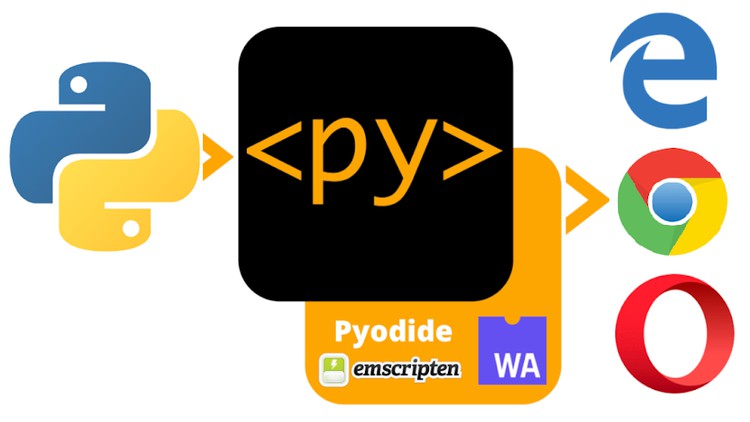
Now write your Python Code Snippets directly in HTML – Taking Web Development to a whole new Level !
What you will learn
Using PyScript to create Python based Web Applications like Dashboards, Apps etc
Various PyScript Tags and Methods
Working with Built in and External Python Libraries
Create REPL like Interface with a single line of Code
Bar, Line, Bokeh Charts using PyScript
Description
Are you a data scientist or a developer who mostly uses Python? Are you jealous of developers who write Javascript code and build fancy websites in a browser? How nice would it be if we could write websites in Python?
Python has grown in popularity immensely in recent years. It has a wide range of applications, from its most popular use in Artificial Intelligence, to Data Science, Robotics, and Scripting. But In the web development field, Python is used mainly on the backend with frameworks such as Django and Flask.
Before now, Python didn’t have much support on the front-end side like other languages such as JavaScript. But thankfully, this year, during the PyCon 2022 conference, Peter Wang (CEO of Anaconda announced a framework named PyScript that allows you to use Python on the web using standard HTML.
So, The only missing piece to make Python a universal programming language is here !
Think of PyScript as the “Minecraft of software development”: Users crafting their own worlds (applications) or new blocks and mods (components and widgets), and sharing them with the world.
This is the exciting beginning for supporting new ways of programming, building, sharing, and deploying applications. PyScript is a game changer and in this course we will learn everything about this awesome new tech skill – the basics, the setup, and coding in PyScript.
Top Reasons why you should choose this Course :
- This course is designed keeping in mind the students from all backgrounds – hence we cover everything from basics, and gradually progress towards advanced topics.
- Complete Code Snippets are shared that are used in Lectures.
- This course can be completed over a Weekend.
- Wonderful collection of useful resources are shared, that will be updated frequently.
- All Doubts will be answered.
A Verifiable Certificate of Completion is presented to all students who undertake this PyScript 101 course.
Content
Introduction
First Steps
PyScript Deep Dive
Creating Plots using PyScript
Advanced PyScript Projects
Resources
Congratulations
The Python-in-Browser Revolution: My Honest Take on PyScript 101
If you have been in the software engineering game as long as I have, you have likely felt the “JavaScript tax.” For years, if you wanted to build anything interactive on the web, you had to pay that tax—switching your brain from Python’s clean syntax to the often-quirky world of JS. When I first heard about PyScript, I was skeptical. We’ve seen attempts to bridge this gap before, but most were clunky or relied on heavy transpilers. However, after diving into the PyScript Fundamentals 101 course, I can confidently say the landscape of web development is shifting in a very exciting direction.
This course isn’t just another dry syntax guide. It targets the fundamental “unlock” that happens when you realize you can leverage the Python ecosystem—think Pandas, NumPy, and Matplotlib—directly within an HTML document. The instructor bypasses the fluff and gets straight into the meat of WebAssembly (Wasm), explaining how Pyodide allows Python to run in the browser’s sandbox. It’s an opinionated look at how we can stop over-complicating our tech stacks. Why build a complex Flask or FastAPI backend just to display a simple data visualization when you can execute that logic client-side? This course provides the hands-on labs necessary to bridge that gap from beginner to advanced concepts without the usual friction.
Prerequisites
- A solid grasp of Python basics (loops, functions, and data structures).
- Fundamental understanding of HTML5 (tags, attributes, and document structure).
- Zero experience with JavaScript is required, though a basic understanding of how browsers render pages helps.
- A modern web browser (Chrome or Firefox) and a simple code editor like VS Code.
Skills & Tools You Will Master
- Pyodide & WebAssembly: Understanding the engine that allows Python to execute in the browser.
- DOM Manipulation with Python: Learning how to use industry-standard tools to change web content without writing a single line of JavaScript.
- Data Visualization: Integrating Bokeh and Matplotlib for high-end, interactive charts.
- External Library Management: Configuring the
<py-config>tag to import 3rd party packages seamlessly. - Interactive REPLs: Deploying real-world projects that include live coding interfaces for users.
Career Benefits & Job Roles
In today’s market, having job-ready skills means being adaptable. Companies are increasingly looking for “Full-Stack Data Scientists”—professionals who don’t just build models in a Jupyter notebook but can also deploy them as accessible web apps. This course acts as a fantastic certification prep for anyone looking to bolster their portfolio with real-world projects that stand out from the sea of generic React apps.
By mastering PyScript, you position yourself for career growth in roles such as:
- Data Product Developer: Building internal dashboards that don’t require a dedicated DevOps team.
- Full-Stack Python Developer: Expanding your reach into the frontend while staying within the Python ecosystem.
- Technical Consultant: Advising firms on how to streamline their internal tooling using browser-based Python logic.
This is a niche but rapidly growing skillset that sets you apart in a crowded job market.
The Pros
- Unrivaled Simplicity: The ability to create a REPL-like interface with literally one line of code is a game-changer for educational tools and internal documentation.
- Ecosystem Access: You aren’t using a “lite” version of Python. Being able to pull in external Python libraries like Pandas directly into the browser allows for heavy lifting that JS often struggles to replicate simply.
- Unified Logic: This course shows you how to keep your business logic and your UI logic in the same language, reducing the cognitive load and making hands-on labs much more intuitive for Python purists.
- Future-Proofing: PyScript is backed by Anaconda and is rapidly evolving. Learning these industry-standard tools now puts you at the forefront of the next wave of web tech.
The Cons
- Initial Load Times: Let’s be real—PyScript carries a bit of “weight.” Because the browser has to load the Python runtime (Pyodide), the initial page load can be sluggish compared to a native JS app. It’s perfect for dashboards and internal tools, but I wouldn’t use it for a high-traffic landing page just yet.