From Basics to Pro Design
What you will learn
Effectively use various key modules of SolidWorks, including Sketching, Part Modeling, Surfacing, Weldments, Assembly, and Drafting.
Understanding and using sketching tools to create 2D profiles and dimensioning and applying constraints to control sketch geometry.
Using 3D tools to create 3D parts from sketches and applying advanced features such as fillets, chamfers, and holes.
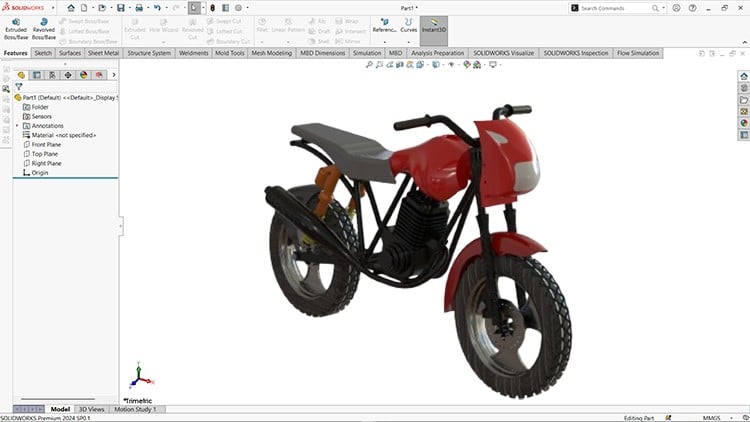
How to bring together different parts of the bike assembly. Using assembly tools like mates, constraints, and motion analysis to simulate how components fit.
How to troubleshoot interferences and adjust parts for correct fitment.
How to create technical drawings from the 3D bike assembly and adding dimensions, annotations, and details to the drawing.
Throughout the course, students will work on the bike assembly project to gain hands-on experience and practice using SolidWorks tools effectively.
Why take this course?
SolidWorks Mastery: Design, Assemble, and Draft a Complete Bike
Unlock the power of SolidWorks with this comprehensive course designed to take you from beginner to expert. Whether you’re a student, professional, or hobbyist, this course will guide you step-by-step through designing bike parts, assembling components, and creating detailed drafting models for manufacturing.
What You’ll Learn:
- Sketching: Learn sketching tools to create 2D profiles and dimensioning and applying constraints to control sketch geometry.
- Part Design: Master the art of designing bike components such as frames, wheels, gears, and more.
- Surfacing: Master the art of designing components using the Surfacing tools.
- Assembly: Learn advanced techniques to assemble the bike components seamlessly.
- Drafting: Create professional 2D drawings for manufacturing with precise dimensions and annotations.
- Industry Techniques: Understand best practices for efficient modeling and real-world applications.
Course Highlights:
- Hands-on projects with real-world bike design examples.
- Clear, concise lessons tailored for all skill levels.
- Practical exercises to reinforce your learning.
- Access to all project files and resources.
Who Should Enroll:
- Engineers and designers aiming to enhance their CAD skills.
- Students preparing for academic or professional projects.
- Hobbyists looking to explore the world of mechanical design.
Join us and start your journey toward SolidWorks mastery. By the end of this course, you’ll have the confidence and skills to bring your designs to life. Whether you’re an engineer, designer, student, or hobbyist, this course equips you with the skills to confidently use SolidWorks for professional or personal projects.
Enroll now and transform your ideas into reality!
The “No-Fluff” Overview: Why This Course Matters in 2024
I’ve spent over a decade in the engineering space, and if there’s one thing that separates a “CAD monkey” from a legitimate design engineer, it’s how they handle industry-standard tools like SOLIDWORKS. The 2024-25 version of “Mastering SOLIDWORKS” isn’t just another tutorial series where you mindlessly follow a cursor. Instead, it feels like a structured mentorship designed to take you from a total beginner to advanced proficiency through a high-stakes, real-world project: designing a complete bike assembly.
Most courses fail because they teach features in a vacuum. You learn how to extrude, but you don’t learn why you should use a specific end condition for design intent. This course bridges that gap. It focuses heavily on the 2024-25 updates, which is crucial because the software’s performance and UI have evolved. What I appreciate most is the emphasis on the “troubleshooting” mindset. In the real world, your mates will break, and your sketches will over-define. This course doesn’t hide from those errors; it teaches you how to fix them, which is where the real career growth happens.
Prerequisites: What You Actually Need
- Hardware: A workstation that meets the 2024-25 system requirements. Don’t try to run this on a basic netbook; you’ll need a decent GPU to handle the assembly and motion analysis modules.
- Software Access: A license or student version of SOLIDWORKS (2023 or later is recommended to follow the UI changes).
- Mindset: A basic understanding of geometry. You don’t need a PhD in math, but being comfortable with 2D planes and 3D space is essential.
- Time: This isn’t a “weekend warrior” course. To truly gain job-ready skills, expect to put in significant time on the hands-on labs.
Skills & Tools: Building a Professional Arsenal
This course moves beyond basic extrusions. You’ll be diving deep into parametric modeling, which is the backbone of modern engineering. The curriculum covers the entire product lifecycle—from the initial 2D profile to the final technical drawing. You’ll master Surfacing (essential for those ergonomic bike components), Weldments (a must-have skill for structural frames), and Assembly Mates that go beyond “coincident” and “concentric.” By the end, you aren’t just making pictures; you’re building a digital twin capable of motion analysis and interference detection.
Career Benefits & Job Roles
If you’re looking for certification prep, this course is a goldmine. It aligns closely with the requirements for the CSWA (Certified SOLIDWORKS Associate) and CSWP (Professional) exams. Adding these credentials to your LinkedIn is a massive signal to recruiters. In terms of roles, this curriculum prepares you for:
- Mechanical Design Engineer: Using 3D tools to develop complex machinery and consumer products.
- Product Designer: Leveraging surfacing tools to create aesthetically pleasing yet functional designs.
- Draftsperson/CAD Technician: Creating high-precision technical drawings that meet ISO/ASME standards.
- Manufacturing Engineer: Using the weldments and assembly modules to optimize production workflows.
The Pros: What They Got Right
- The Bike Project: Instead of building random blocks, you build a bike. This real-world project forces you to think about how parts interact, which is much more engaging than isolated exercises.
- Emphasis on Troubleshooting: Most instructors edit out the mistakes. This course keeps them in, showing you how to resolve interferences and fix “red” sketches. This is arguably the most valuable job-ready skill you can learn.
- Comprehensive Drafting: People often skip the 2D side, but technical drawings are how things actually get built. The focus on annotations and dimensioning is top-tier.
- Current Content: It addresses the 2024-25 interface specifically, meaning you won’t be hunting for buttons that moved three years ago.
The Cons: An Honest Critique
If there’s one gripe, it’s the pacing in the Surfacing module. Surfacing is notoriously difficult and “math-heavy” in the background. While the course covers the tools effectively, a beginner might find the jump from basic part modeling to complex surface curvature a bit steep. I would have liked to see a few more “bridge” exercises between those two sections to help students find their footing before diving into the complex bike frame aesthetics.
Final Verdict
Is it worth it? If you’re serious about a career in engineering or design, yes. It moves past the “what” and teaches you the “how” and “why.” You’ll walk away not just knowing the software, but understanding the industry-standard workflows that make you a valuable asset to any design team.