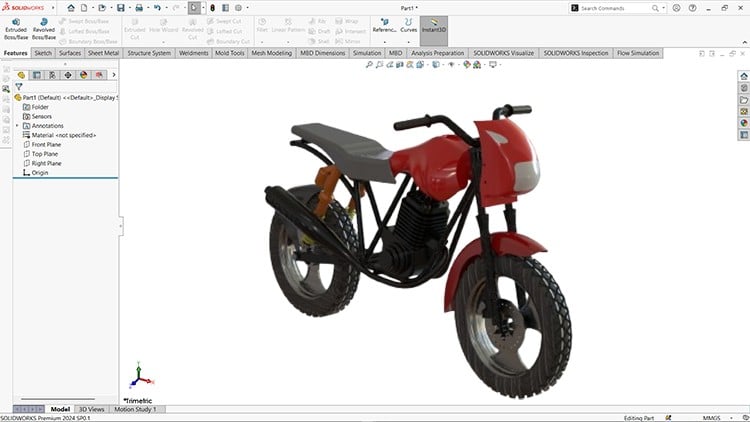
From Basics to Pro Design
⏱️ Length: 8.0 total hours
⭐ 4.18/5 rating
👥 8,885 students
🔄 April 2025 update
Add-On Information:
Note➛ Make sure your 𝐔𝐝𝐞𝐦𝐲 cart has only this course you're going to enroll it now, Remove all other courses from the 𝐔𝐝𝐞𝐦𝐲 cart before Enrolling!
- Course Title: Mastering SOLIDWORKS (2024-25): A Complete Course
- Course Caption: From Basics to Pro Design | Length: 8.0 total hours | 4.18/5 rating | 8,885 students | April 2025 update
- Course Overview
- This comprehensive, updated course is meticulously crafted to transform individuals with little to no prior experience into proficient SOLIDWORKS users, capable of tackling complex design challenges. It serves as an essential stepping stone for anyone aspiring to excel in product development, mechanical engineering, or industrial design, offering a structured pathway through the core functionalities of the world’s leading 3D CAD software. The curriculum fosters a deeper understanding of design principles and engineering methodologies, beyond just software commands.
- Dive into the realm of virtual prototyping, where your innovative concepts transition from abstract ideas into tangible, digital models ready for manufacturing. The course emphasizes practical application through engaging projects simulating real-world design, ensuring theoretical knowledge is reinforced with hands-on experience. This 2024-25 edition incorporates the latest features and best practices, keeping you at the forefront of industry standards.
- Explore the full spectrum of SOLIDWORKS capabilities crucial for modern product development, from conceptual ideation to the generation of production-ready technical documentation. The structured approach builds expertise from fundamental operations to advanced techniques, empowering you to design, analyze, and communicate your engineering vision effectively.
- Uncover the power of integrated design tools that streamline your workflow and enhance your productivity. This course goes beyond mere feature explanations, focusing on strategic application and efficient design strategies employed by professionals, preparing you for immediate impact in a professional setting.
- Requirements / Prerequisites
- A working installation of SOLIDWORKS (2024 or 2025 preferred; earlier versions like 2023 may suffice, though specific UI/feature updates might differ). Access to the software is fundamental for practical exercises.
- A computer capable of running SOLIDWORKS smoothly, meeting minimum system requirements (sufficient RAM, capable processor, and dedicated graphics card highly recommended).
- Basic computer literacy, including familiarity with navigating operating systems, managing files, and using standard software applications. No prior CAD experience is strictly required, as the course initiates from foundational concepts.
- A strong desire to learn 3D design and engineering principles. An inquisitive mindset and commitment to regular practice will significantly enhance your learning journey and skill acquisition.
- While not mandatory, a foundational understanding of geometry, basic mathematics, and mechanical principles can provide a slight advantage in grasping certain engineering concepts more quickly.
- Skills Covered / Tools Used
- Parametric Modeling Proficiency: Master the principles of feature-based, parametric solid modeling, enabling you to create robust and easily modifiable designs. This includes understanding design intent, parent-child relationships, and utilizing various feature types for complex geometries.
- Conceptual Design & Iteration: Develop the ability to rapidly translate initial concepts into detailed 3D models, facilitating quick design iterations and visual feedback during product development. Learn techniques for exploring design alternatives efficiently.
- Complex Geometry Creation: Gain expertise in generating intricate shapes and forms, moving beyond basic prismatic features to encompass organic and highly detailed designs often found in consumer products or specialized components. Involves strategic use of advanced modeling techniques.
- Structural System Development: Understand how to design and detail frameworks, trusses, and welded structures, integrating manufacturing considerations directly into the design process for optimized fabrication. Learn to manage and specify materials for specialized applications.
- Interdisciplinary Design Integration: Acquire skills in assembling multiple components into functional systems, ensuring proper fit, form, and function. Involves positioning parts and understanding their mechanical/spatial interactions within an overarching design.
- Manufacturing Documentation Generation: Learn to produce professional-grade technical drawings adhering to industry standards, effectively communicating all necessary information for manufacturing, inspection, and assembly, including BOMs, tolerances, and surface finish indications.
- Design Validation Fundamentals: Grasp the basics of checking designs for potential issues before physical prototyping, minimizing errors and rework costs. Involves analyzing component interactions and spatial relationships.
- Efficiency & Workflow Optimization: Discover best practices and advanced techniques for working smarter, not harder, within SOLIDWORKS, enhancing productivity and design speed for professional projects.
- Benefits / Outcomes
- Enhanced Employability & Career Advancement: Position yourself as a valuable asset in engineering, manufacturing, and design, opening doors to roles requiring advanced CAD proficiency.
- Confidence in Tackling Complex Projects: Gain self-assurance and technical capability to independently undertake intricate 3D modeling and assembly projects, from concept to production documentation.
- Improved Problem-Solving Skills: Develop a systematic approach to design challenges, leveraging SOLIDWORKS’ analytical tools to identify potential issues and devise effective solutions proactively.
- Foundation for Advanced CAD/CAE Studies: Establish a strong 3D CAD foundation, a springboard for specialized areas like FEA, CFD, CAM, or advanced surfacing.
- Ability to Innovate & Prototype Virtually: Transform your innovative ideas into detailed virtual prototypes, accelerating the design cycle and enabling product refinement before physical manufacturing costs.
- Professional Portfolio Enhancement: Create a compelling portfolio of sophisticated 3D models and engineering drawings, showcasing practical skills to potential employers.
- Access to a Global Design Community: Join a vast community of SOLIDWORKS users, enabling networking, collaboration, and continuous learning opportunities within the CAD industry.
- PROS of This Course
- Structured Learning Path: Follows a logical progression, making complex topics accessible to beginners while providing depth for intermediate users.
- Practical, Project-Based Approach: Emphasizes hands-on application, ensuring learned concepts are immediately put into practice through relevant exercises.
- Up-to-Date Content: The “April 2025 update” ensures learning the latest features and workflows, relevant to current industry practices.
- Accessibility and Flexibility: As an online course, it offers flexibility to learn at your own pace and schedule, fitting diverse lifestyles.
- Strong Peer & Instructor Support Potential: Likely forum support or Q&A sections to help overcome challenges (assuming typical online course setup).
- Cost-Effective Skill Acquisition: Provides comprehensive skill set without higher costs and time commitments of traditional education.
- High Student Satisfaction & Popularity: Indicated by 4.18/5 rating and 8,885 students, suggesting a well-received and effective learning experience.
- CONS of This Course
- Limited Direct Instructor Interaction: While thorough, the self-paced online format might offer less direct, personalized feedback or immediate instructor interaction compared to live classroom settings.
Learning Tracks: English,Design,Design Tools
Found It Free? Share It Fast!