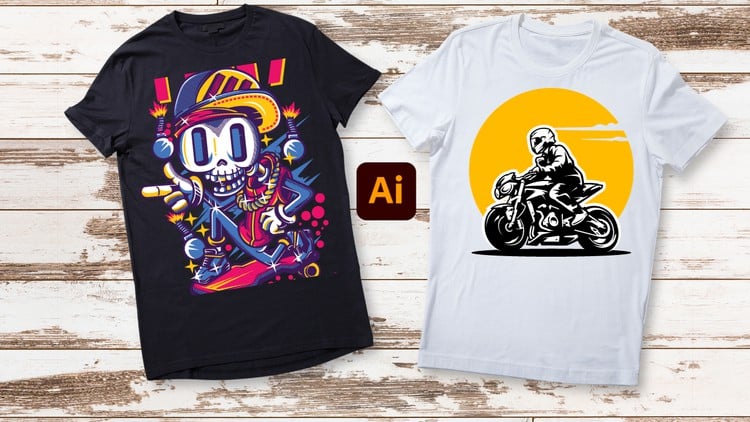
Unleash Your Creativity: From Beginner Brushstrokes to Expert Masterpieces – T-Shirt Design in Adobe Illustrator
⏱️ Length: 4.4 total hours
⭐ 4.19/5 rating
👥 19,484 students
🔄 November 2023 update
Add-On Information:
Note➛ Make sure your 𝐔𝐝𝐞𝐦𝐲 cart has only this course you're going to enroll it now, Remove all other courses from the 𝐔𝐝𝐞𝐦𝐲 cart before Enrolling!
- Course Overview
- Foundational Vector Theory: This course dives deep into the core mechanics of vector-based illustration, explaining why Adobe Illustrator is the superior choice for apparel design compared to pixel-based software, ensuring your designs remain crisp at any print size.
- Comprehensive Learning Path: Spanning 4.4 hours of high-intensity training, the curriculum is structured to take you from opening the software for the first time to exporting complex, retail-ready artwork that meets professional manufacturing standards.
- Industry-Standard Focus: The content is specifically curated for the garment industry, focusing on practical techniques used by professional merchandise designers to create wearable art that is both aesthetically pleasing and technically viable for various printing methods.
- Strategic Design Thinking: Beyond just pushing buttons, the course emphasizes the conceptual side of design, teaching you how to brainstorm and execute t-shirt concepts that resonate with specific target audiences and market trends.
- Modern Workflow Integration: Updated as of November 2023, the course incorporates the latest Illustrator features and shortcuts, streamlining your creative process and reducing the time spent on repetitive technical tasks.
- Requirements / Prerequisites
- Software Accessibility: You must have access to Adobe Illustrator (Creative Cloud version recommended). While older versions may work, the course utilizes modern tools that are essential for the expert-level techniques demonstrated.
- Basic Computing Literacy: A fundamental understanding of your computer’s operating system, including file management, downloading resources, and installing software, is necessary to keep pace with the lessons.
- Hardware Essentials: A reliable computer with a mouse or a digital drawing tablet is required. While a mouse is sufficient for many vector tasks, a tablet can enhance the “Beginner to Expert” transition for more organic illustrative elements.
- Creative Curiosity: No prior drawing skills or graphic design experience are required, but a strong desire to learn the visual language of apparel and a willingness to practice repetitive actions is vital for success.
- Skills Covered / Tools Used
- The Precision Pen Tool: Master the most powerful tool in the Illustrator arsenal to create custom shapes, clean outlines, and intricate silhouettes that form the backbone of high-quality t-shirt graphics.
- Advanced Typography Manipulation: Learn to go beyond standard fonts by using Type on a Path, Envelope Distort, and Custom Lettering techniques to create catchy, balanced slogans that stand out in a crowded marketplace.
- Efficient Shape Building: Utilize the Shape Builder Tool and Pathfinder Panel to merge, subtract, and intersect geometric forms, allowing you to construct complex illustrations from simple circles and squares.
- Color Theory and Palettes: Gain expertise in choosing the right color schemes, working with Global Colors, and understanding the limitations of CMYK versus RGB to ensure your screen prints look exactly like your digital file.
- Texture and Distressing: Learn how to apply Opacity Masks and grain textures to give your designs a popular “vintage” or “worn” look without compromising the editability of the underlying vector paths.
- Artboard and Layer Organization: Discover the professional way to organize your workspace using layers and sub-layers, which is a critical skill when handing off files to commercial printers or working in a design agency.
- Live Trace Mastery: Learn the expert settings for the Image Trace feature to convert hand-drawn sketches or high-resolution photos into clean, scalable vector art ready for the printing press.
- Benefits / Outcomes
- Professional Portfolio Development: By the end of the course, you will have completed several unique t-shirt designs that can be used to build a professional portfolio for freelance opportunities or job applications.
- Print-on-Demand Readiness: You will gain the technical knowledge required to upload designs to platforms like Merch by Amazon, Redbubble, and Printful, ensuring your files meet their specific transparency and resolution requirements.
- Commercial Design Confidence: Transition from a hobbyist to a designer who understands technical specifications like trapping, overprinting, and spot colors, which are essential for professional screen printing.
- Scalable Passive Income Potential: Master the ability to create “evergreen” designs that can be sold repeatedly online, providing you with the tools to start your own apparel brand with minimal overhead.
- Enhanced Creative Speed: Through the use of Actions and Custom Workspaces, you will learn to produce designs significantly faster, allowing you to move from concept to finished product in a fraction of the time.
- Universal Vector Skills: The skills learned in this course are highly transferable; once you master Illustrator for t-shirts, you can easily pivot to designing logos, posters, icons, and social media graphics.
- PROS
- Targeted Specialization: Unlike general Illustrator courses, every lesson is filtered through the lens of t-shirt design, making it highly relevant for aspiring apparel entrepreneurs.
- Vast Student Community: Joining a cohort of over 19,000 students provides a sense of community and the assurance that the course material has been vetted and proven effective by many others.
- Concise and Potent: At 4.4 hours, the course avoids unnecessary “fluff,” respecting your time while providing a deep dive into expert-level techniques.
- CONS
- Software Dependency: The course is strictly built around the Adobe ecosystem, meaning students who prefer open-source or one-time-purchase software may find the techniques difficult to replicate exactly in other programs.
Learning Tracks: English,Design,Graphic Design & Illustration
Found It Free? Share It Fast!