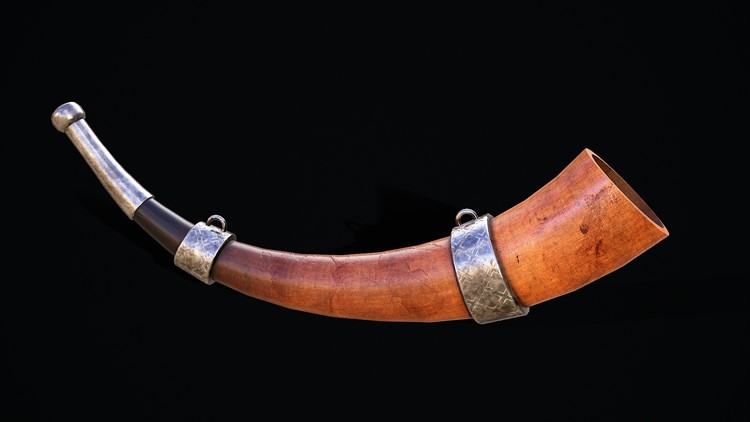
Master the Art of 3D Modeling and Texturing for Game Development
What you will learn
Master 3D Modeling Techniques in Maya: By the end of this course, students will be able to create a detailed 3D war horn model using various modeling techniques
Texture and Paint Models in Substance Painter: Students will learn to apply realistic textures and materials to their 3D war horn model using Substance Painter.
Optimize 3D Models for Animation and Rendering: Students will understand how to optimize their 3D war horn models for efficient animation and rendering.
Integrate 3D Assets into Game Engines: By the end of the course, students will be able to import them into popular game engine Unreal Engine.,
Why take this course?
Course Description:
Unlock the secrets of professional 3D modeling and texturing with our comprehensive course, “Create a 3D War Horn in Maya and Substance Painter.” This course is designed for both beginners and intermediate 3D artists who are looking to elevate their skills and create stunning, game-ready assets. Through step-by-step instructions and hands-on projects, you will learn how to model, texture, and optimize a detailed 3D war horn using industry-standard software: Autodesk Maya and Substance Painter.
What You’ll Learn:
- Master 3D Modeling Techniques in Maya: Learn to create a detailed 3D war horn model using various modeling techniques, including polygonal modeling, sculpting, and texturing in Autodesk Maya.
- Texture and Paint Models in Substance Painter: Discover how to apply realistic textures and materials to your 3D war horn model using Substance Painter, mastering techniques such as baking, painting, and layering textures.
- Integrate 3D Assets into Game Engines: Export your textured 3D war horn models from Maya and Substance Painter and import them into popular game engines like Unity or Unreal Engine, ready for use in game development projects.
Course Content:
- Introduction to 3D Modeling in Maya
- Getting started with Autodesk Maya
- Creating the base shape of the war horn
- Advanced Modeling Techniques
- Adding intricate details and sculpting
- Refining shapes and edges
- Preparing the model for texturing
- Introduction to Substance Painter
- Setting up your project in Substance Painter
- Importing the 3D model from Maya
- Texturing and Painting in Substance Painter
- Applying base materials and textures
- Adding details and weathering effects
- Baking and exporting textures
- Optimizing and Exporting Models
- UV mapping and optimization techniques
- Exporting models for game engines
- Integrating with Game Engines
- Importing models into Unreal Engine
- Final adjustments and troubleshooting
Who This Course is For:
- Aspiring 3D artists and modelers
- Game developers looking to create detailed assets
- Intermediate 3D artists wanting to refine their skills
- Anyone interested in learning Maya and Substance Painter
Course Requirements:
- Basic understanding of 3D modeling concepts
- A computer capable of running Autodesk Maya and Substance Painter
- Autodesk Maya and Substance Painter software (free trial or licensed versions)
Enroll Now:
Join us in “Create a 3D War Horn in Maya and Substance Painter” and take your 3D modeling skills to the next level. Enroll now and start creating stunning, game-ready assets today!
- Course Overview
- Experience a comprehensive, project-based journey that takes you from a blank canvas to a fully realized, battle-hardened war horn designed for modern game engines.
- This course bridges the gap between conceptual design and final production, focusing on the specialized workflow required to create high-fidelity 3D assets.
- You will explore the aesthetic principles of prop design, ensuring that the silhouette, weight, and intricate details of the horn resonate with a historical or fantasy setting.
- The curriculum emphasizes a professional pipeline, teaching you how to move assets seamlessly between Maya for structural integrity and Substance Painter for immersive storytelling through textures.
- Requirements / Prerequisites
- A functional workstation equipped with Autodesk Maya (2020 or newer) and Adobe Substance 3D Painter to follow along with the technical demonstrations.
- A basic understanding of the 3D coordinate system (X, Y, Z) and familiarity with navigating a digital 3D viewport is highly recommended.
- A three-button mouse is essential for precise manipulation of vertices, edges, and brush strokes within the software environments.
- Hardware capable of handling real-time texture baking and high-resolution viewport shading is necessary to ensure a smooth creative process.
- Skills Covered / Tools Used
- Mastery of Sub-D Modeling techniques in Maya to create smooth, organic curves that mimic natural animal horn structures.
- Advanced UV Unwrapping strategies to maximize texel density and ensure that textures remain crisp without visible seams.
- Implementation of High-to-Low Poly Baking workflows, capturing intricate sculpted details into optimized game-ready meshes.
- Utilizing PBR (Physically Based Rendering) principles in Substance Painter to accurately simulate real-world materials like weathered brass, polished ivory, and aged leather straps.
- Procedural Masking and Generators to add realistic wear and tear, such as accumulated dirt in crevices and scuffs on high-traffic edges.
- Benefits / Outcomes
- Develop a high-quality, professional-grade portfolio piece that demonstrates your ability to handle both hard-surface and organic modeling challenges.
- Gain a deep understanding of the Industry-Standard Pipeline, making you more competitive for roles in game development or cinematic asset creation.
- Learn the art of visual storytelling by applying “history” to your models through smart texturing, showing the passage of time and usage on the object.
- Acquire a transferable skillset that allows you to apply these modeling and texturing logic patterns to any other 3D prop or character accessory.
- PROS
- Step-by-step instruction that demystifies complex Topology and Baking issues often encountered by beginners.
- Focuses on creating a “Hero Prop,” teaching you how to give a single object the level of detail required for close-up inspection in-game.
- Highly efficient workflows that prioritize both visual quality and technical optimization for real-time performance.
- CONS
- The course is specifically tailored to the Maya-Substance pipeline, which may require a subscription to professional software suites to fully participate.