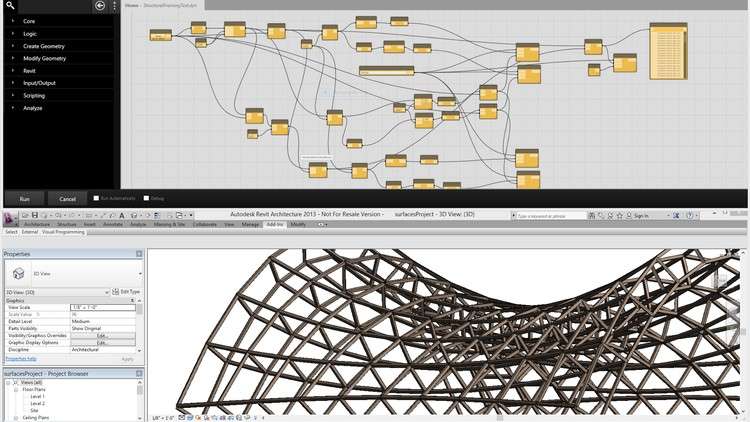
Mastering Dynamo and Generative Design: From Fundamentals to Advanced Techniques- Complex Forms and Data Management
What you will learn
Introduction to Dynamo: Environment and Node Basics
Generating Sequential Numbers with Code Block and List Nodes
Creating Furniture Forms with Rectangle and Plane Nodes
Transforming and Mirroring Shapes with Translate and Mirror Nodes
Advanced Shape Manipulation with Offset and Sweep Nodes
Creating Basic Shapes with Point and Line Nodes
Advanced Shape Creation with Circle, Polygon, and Ellipse Nodes
Adding Volume to Shapes with Extrude and Loft Nodes
Creating Complex Shapes with Nurb and Polycurve Nodes
Building Tower and Bridge Forms with Advanced Nodes
Why take this course?
Do you want to know how to automate tasks in Revit using Dynamo?
Do you want to know how to optimize your complex Revit models for performance and efficiency?
Do you want to know how parametric design can help in creating complex shapes and designs in architecture and engineering?
The Dynamo course covers the fundamentals of using Dynamo in building information modeling. The course starts with an introduction to Dynamo’s environment, node types, and integer and number values. It then moves on to more advanced topics such as creating forms parametrically, creating circles, polygons, and ellipses using nodes, and extruding shapes. You will also learn to manipulate geometry using translation and mirroring. The course includes several exercises to reinforce learning, including creating a multi-story parking garage, a forest tower, and Athens Olympic Sports Complex by Calatrava.
Headlines:
- Dynamo Fundamentals: Getting Started with Node-Based Design
- Building Custom Shapes: Exploring Integer and Number Values in Dynamo
- Creating Parametric Forms: Using Line and Circle Nodes in Dynamo
- Advanced Geometry: From Regular Polygons to Lofted Solids in Dynamo
- Practical Applications: Extruding Shapes and Creating Curved Surfaces in Dynamo
- Parametric Modeling: Using Transpose, Offset, and Sweep Nodes in Dynamo
- Mastering Curves: Using Polycurves and Fillet Nodes in Dynamo
- Dynamic Design: Creating Custom Forms with NURBS and Control Points in Dynamo
- Advanced Techniques: Using List Manipulation and Lacing in Dynamo
- From Sketch to Structure: Building Complex Forms with Dynamo’s Node-Based Workflow
This course is packed with real-life examples that immerse you in project situations and facilitate effective learning. Additionally, you’re encouraged to ask any questions you may have while watching the course, ensuring a comprehensive understanding of the subject matter.
Course Review: Learn Dynamo in Revit: Zero to Hero in Hindi
Alright folks, let’s talk about a course that’s been on my radar: ‘Learn Dynamo in Revit: Zero to Hero in Hindi’. As someone who’s spent a good chunk of time navigating the complexities of BIM and parametric design, I was curious to see how this Hindi-language course tackles Dynamo, especially for those starting from scratch. My take? It’s a pretty solid offering, especially if you’re looking to level up your Revit game with a focus on automation and generative design principles.
Overview
This isn’t just another click-through tutorial. The ‘Zero to Hero’ promise is largely delivered, guiding learners from the absolute basics of the Dynamo environment and its node-based programming – think of it as visual scripting – all the way to building intricate forms and managing data effectively within Revit. The curriculum smartly progresses, starting with fundamental node operations like generating sequences and creating basic geometry with points and lines. It then dives into more sophisticated techniques, covering the creation of furniture, transforming and mirroring shapes, and adding volume through extrusions and lofts. The latter modules, focusing on NURBS, polycurves, and building complex structures like towers and bridges, are where the ‘advanced’ in the course title really shines. This structured approach ensures that by the end, you’re not just playing with nodes, but you’re developing a genuine understanding of how to leverage Dynamo for **complex geometric challenges** and **efficient data workflows**.
Prerequisites
The course explicitly states it’s for beginners, and for the most part, it holds true. However, a foundational understanding of **Revit** is definitely a big plus. While Dynamo is a separate interface, its power is unlocked when you can connect it to your Revit models. Having a grasp of basic Revit families, project organization, and modeling concepts will make the transition smoother and the learning more impactful. No prior programming knowledge is needed, which is the beauty of Dynamo’s visual scripting approach, but a general comfort with using software and navigating interfaces is assumed.
Skills & Tools
Upon completion, you’ll be proficient in:
- Navigating and utilizing the Dynamo environment.
- Using Code Blocks and List Nodes for data manipulation.
- Generating various geometric forms from basic shapes to complex NURBS and polycurves.
- Applying transformations like translate and mirror to elements.
- Creating volumetric elements using Extrude and Loft nodes.
- Building parametric models for architectural and furniture design.
- Understanding basic principles of generative design.
The primary tool, of course, is Autodesk Revit, with Dynamo integrated within it. You’ll also be working with various built-in Dynamo nodes, learning to combine them into functional scripts.
Career Benefits & Job Roles
For anyone in the AEC (Architecture, Engineering, Construction) industry, mastering Dynamo is a significant career booster. It’s a direct pathway to becoming more efficient in your daily tasks, automating repetitive processes, and tackling design challenges that would be cumbersome or impossible with manual Revit workflows. This course can be particularly beneficial for those preparing for certifications that involve advanced Revit functionalities. Job roles that can benefit immensely include BIM Coordinators, BIM Specialists, Computational Designers, Architectural Technologists, and even Design Engineers looking to enhance their parametric modeling capabilities. It equips you with **job-ready skills** that are increasingly in demand.
Pros
- Comprehensive Curriculum: Covers a wide spectrum from foundational node usage to advanced shape creation and structural forms, making it a true ‘zero to hero’ journey.
- Practical Application: The focus on creating actual forms like furniture, towers, and bridges, rather than just theoretical concepts, provides tangible results and reinforces learning through real-world projects.
- Hindi Language Support: For Hindi-speaking professionals, this offers a significant advantage, breaking down language barriers in learning a complex, English-dominant software like Dynamo.
Cons
The only significant drawback I can see is that while the course covers a lot of ground, the depth on extremely complex, niche applications or advanced scripting with Python within Dynamo might be limited. For those aiming to become pure Computational Design experts pushing the absolute boundaries, further specialized learning might be required post this course. However, for most BIM professionals looking to integrate powerful parametric design into their Revit workflow, this course provides an excellent and robust foundation for substantial career growth.