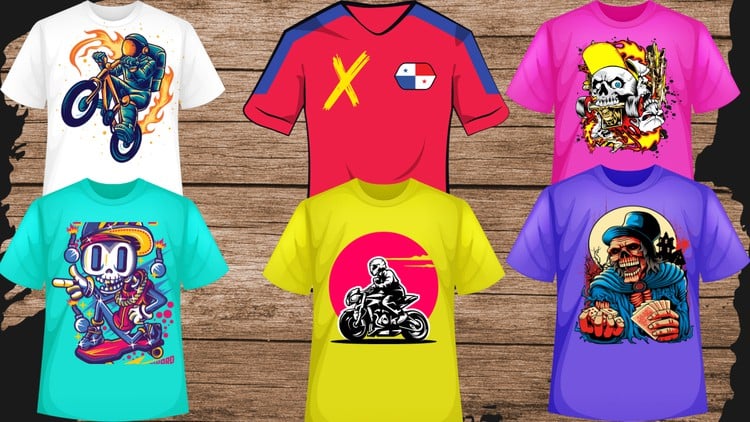
Become a T-Shirt Design Pro: Learn Advanced Techniques with Adobe Illustrator
⏱️ Length: 4.3 total hours
⭐ 3.98/5 rating
👥 22,025 students
🔄 June 2024 update
Add-On Information:
Note➛ Make sure your 𝐔𝐝𝐞𝐦𝐲 cart has only this course you're going to enroll it now, Remove all other courses from the 𝐔𝐝𝐞𝐦𝐲 cart before Enrolling!
- Course Overview
- Unlock your creative potential in the dynamic world of apparel graphics with this comprehensive Adobe Illustrator course, designed to transform you from a novice to a confident t-shirt designer.
- Dive deep into the industry-standard software, mastering the fundamental principles and progressive techniques essential for crafting visually compelling and commercially viable t-shirt artwork.
- This course offers a structured learning path, ensuring a solid grasp of foundational concepts before smoothly transitioning into sophisticated design strategies and advanced workflows.
- Experience a hands-on approach with practical examples and real-world project simulations, empowering you to apply learned skills immediately to your own design concepts.
- Explore the art and science of t-shirt design, understanding the nuances of creating graphics that not only look great but also translate effectively onto various fabric types and printing methods.
- Gain insights into the professional t-shirt design process, from initial ideation and sketching to final artwork preparation for production, making you production-ready.
- Discover how to build a distinctive design style and develop a portfolio that showcases your proficiency in Adobe Illustrator for t-shirt applications.
- Benefit from a curated curriculum that emphasizes efficiency and creativity, allowing you to produce high-quality designs with confidence and speed.
- This course is meticulously crafted to foster a deep understanding of vector graphics and their application in the fashion and merchandise industries, providing a competitive edge.
- Whether you aim to launch your own t-shirt brand, create custom designs for clients, or enhance your existing graphic design skillset, this program provides the necessary tools and knowledge.
- Requirements / Prerequisites
- A computer (Windows or macOS) capable of running Adobe Illustrator.
- A licensed or trial version of Adobe Illustrator installed on your system.
- Basic computer literacy and familiarity with navigating your operating system.
- An eagerness to learn and experiment with design tools and concepts.
- No prior experience with Adobe Illustrator or t-shirt design is necessary, making it accessible for absolute beginners.
- A willingness to practice and apply the techniques taught throughout the course.
- Skills Covered / Tools Used
- Vector Manipulation: Mastering the pen tool, shape builders, and pathfinder operations for precise vector creation and modification.
- Layer Management: Efficiently organizing design elements using layers for a streamlined workflow and easy editing.
- Typography Styling: Advanced techniques for font selection, kerning, leading, tracking, and creating custom text effects that enhance t-shirt graphics.
- Color Theory & Application: Developing an understanding of color palettes, harmonies, and applying them effectively to evoke specific moods and brand identities.
- Pattern Generation: Creating seamless patterns and textures for all-over prints or unique design elements.
- Iconography & Illustration: Designing original graphics, symbols, and illustrations that are unique and eye-catching.
- Embellishment Techniques: Simulating embroidery, screen print effects, and other embellishments within Illustrator.
- File Preparation for Production: Understanding resolution, color modes (CMYK vs. RGB), bleed, and export settings for various printing processes (screen printing, DTG, etc.).
- Brush & Gradient Mastery: Utilizing advanced brush settings and gradient meshes for nuanced shading and dynamic visual appeal.
- Distressing & Aged Effects: Creating authentic vintage and worn-out looks that add character to t-shirt designs.
- Vector Brushes & Textures: Applying and creating custom vector brushes for organic lines and realistic textures.
- Composition & Layout: Arranging design elements effectively for maximum visual impact on a t-shirt canvas.
- Benefits / Outcomes
- Professional Design Output: Produce polished, print-ready t-shirt designs that rival professional standards.
- Enhanced Creative Confidence: Develop the assurance to tackle complex design challenges and express your artistic vision.
- Marketable Skillset: Acquire a highly sought-after skill in the booming t-shirt and apparel customization industry.
- Brand Development Potential: Lay the groundwork for creating your own t-shirt line or offering design services to businesses.
- Efficient Workflow: Learn time-saving techniques and shortcuts within Adobe Illustrator to boost productivity.
- Problem-Solving Abilities: Gain the capacity to troubleshoot design issues and adapt designs for different printing requirements.
- Portfolio Building: Create a collection of diverse t-shirt designs to showcase your expertise to potential clients or employers.
- Understanding of Print Limitations: Develop a practical awareness of how design choices impact the final printed product.
- Versatility in Design Styles: Master a range of styles, from minimalist to intricate, enabling you to cater to diverse client needs.
- Personal Project Realization: Bring your unique t-shirt design ideas to life with professional execution.
- PROS
- Comprehensive Skill Progression: The course effectively bridges the gap between beginner fundamentals and advanced, industry-relevant techniques.
- Practical, Project-Based Learning: Emphasis on hands-on application ensures learners can immediately translate knowledge into tangible designs.
- Up-to-Date Content: Regular updates (June 2024) guarantee that the course covers current software features and design trends.
- High Student Satisfaction: A strong rating (3.98/5) and large student base (22,025) indicate a proven track record of delivering value.
- Focus on Print Optimization: Crucial for t-shirt design, the course ensures learners understand how to prepare files for actual production.
- CONS
- Limited to Adobe Illustrator: While powerful, the course exclusively focuses on Illustrator, meaning learners will need to explore other software for different aspects of a t-shirt business (e.g., mockups in Photoshop, marketing).
Learning Tracks: English,Design,Graphic Design & Illustration
Found It Free? Share It Fast!