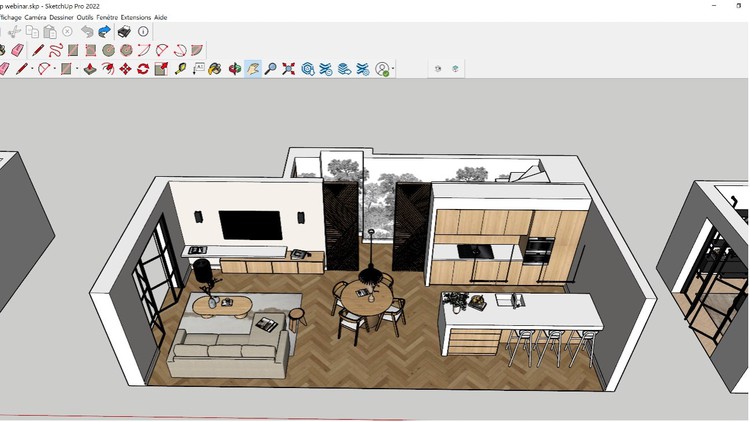
Simple Steps to Building Stunning 3D Models with SketchUp 2023
⏱️ Length: 3.6 total hours
⭐ 4.49/5 rating
👥 41,070 students
🔄 January 2024 update
Add-On Information:
Note➛ Make sure your 𝐔𝐝𝐞𝐦𝐲 cart has only this course you're going to enroll it now, Remove all other courses from the 𝐔𝐝𝐞𝐦𝐲 cart before Enrolling!
-
Course Overview
- This course offers a streamlined yet comprehensive journey into 3D modeling with SketchUp 2023, meticulously designed for beginners and those solidifying foundations.
- Structured as an ‘A-Z’ guide, it covers every crucial aspect from initial setup to advanced visualization techniques in an easy-to-digest format.
- Embark on a practical learning adventure that demystifies complex 3D concepts, breaking them down into simple, actionable steps.
- Empower learners across various disciplines – including architecture, interior design, product design, and hobbyist creators – to translate creative visions into stunning digital models.
- Discover SketchUp 2023’s efficiency and intuitive power, transforming abstract ideas into tangible 3D realities with confidence.
- The curriculum emphasizes hands-on application, guiding you through exercises that progressively build proficiency, ensuring mastery without overwhelming complexity.
- Cultivate critical thinking and problem-solving skills essential for navigating real-world design challenges within a 3D environment.
- It’s more than software learning; it’s about understanding spatial relationships and design principles through digital fabrication.
-
Requirements / Prerequisites
- Software Access: A working installation of SketchUp 2023 (or compatible recent version) is essential for hands-on practice; free trials or student licenses suffice.
- Computer: A moderately powerful desktop or laptop capable of running SketchUp smoothly. Refer to SketchUp 2023’s recommended hardware for optimal performance.
- Basic Computer Literacy: Familiarity with general computer operations, file management, and using a mouse (preferably with a scroll wheel) is beneficial.
- No Prior 3D Modeling Experience: Absolutely no previous SketchUp or 3D modeling experience is required, as this course starts from fundamental concepts.
- Enthusiasm for Design: A genuine interest in design, visualization, or creating three-dimensional objects will greatly enhance the learning experience.
- Internet Connection: A stable internet connection for accessing course materials, downloading exercise files, and potential SketchUp extensions.
- Note-taking Tools: Pen and paper or digital note-taking software to jot down key concepts and tips.
-
Skills Covered / Tools Used
- Advanced Selection Techniques: Master sophisticated geometry selection, including component selection, group editing, and utilizing tags for complex scene management.
- Component Creation & Management: Deep dive into creating reusable components, basic dynamic components, and leveraging the 3D Warehouse for efficient model building.
- Scene Organization & Layering (Tags): Implement professional workflows using tags (formerly layers), groups, and the Outliner panel for efficient project management of large models.
- Precision Drawing & Measurement: Go beyond basic tools; explore specialized drawing techniques, precise curve creation, and utilize Tape Measure, Protractor, and Dimension tools for accuracy.
- Working with Sections: Create and manipulate section planes to view internal structures, invaluable for architectural documentation and understanding complex assemblies.
- Custom Styles & Visual Presentation: Customize model display styles, create unique visual aesthetics, and control edge settings, profiles, and backgrounds for impactful presentations.
- Model Export & Interoperability: Understand various file formats for exporting SketchUp models, facilitating use in other software, sharing, and cross-platform collaboration.
- Introduction to Plugins/Extensions: Glimpse how SketchUp extensions augment core functionalities and streamline advanced modeling tasks.
- Photo-Matching Fundamentals: Introductory exploration into matching 3D models with existing photographs for powerful context and visualization.
-
Benefits / Outcomes
- Confident 3D Modeler: Emerge as a proficient and confident SketchUp user, capable of independently tackling a wide array of 3D modeling projects.
- Portfolio-Ready Projects: Develop a collection of practical, high-quality 3D models suitable for a professional portfolio or personal showcase.
- Accelerated Design Workflow: Significantly reduce design iteration times and improve project efficiency by mastering SketchUp’s intuitive toolset.
- Enhanced Spatial Awareness: Cultivate a deeper understanding of spatial relationships, proportions, and form, transcending basic software operation into genuine design thinking.
- Effective Idea Visualization: Gain the ability to clearly communicate design concepts to clients, colleagues, or stakeholders through compelling 3D visualizations.
- Foundation for Advanced Visualization: Lay a solid groundwork for further exploration into advanced rendering engines, animation, and virtual reality applications with SketchUp models.
- Problem-Solving Proficiency: Acquire analytical skills to approach and resolve complex geometric and design challenges within a 3D environment.
- Self-Sufficiency in Design: Empower yourself to bring personal projects to life, from custom furniture to home renovation plans, without external design services.
- Career Advancement Potential: Open doors to new opportunities in fields requiring 3D visualization, such as architecture, interior design, and exhibition design.
-
PROS
- Concise & Efficient: At just 3.6 hours, it delivers comprehensive learning in a highly time-efficient manner, ideal for busy individuals.
- High Student Satisfaction: A stellar 4.49/5 rating from over 41,000 students underscores the course’s quality and effectiveness.
- Massive Community: Join a vast community of over 41,070 learners, offering potential for peer support and shared learning.
- Up-to-Date Content: The January 2024 update ensures learning of SketchUp 2023’s latest features and best practices.
- Beginner-Friendly: Explicitly designed as an “A-Z” course, it perfectly caters to absolute beginners, removing 3D modeling entry barriers.
- Practical, Hands-on Approach: Emphasis on “Simple Steps to Building Stunning 3D Models” signifies a project-based learning methodology.
-
CONS
- Limited Advanced Depth: While comprehensive for an A-Z introduction, the relatively short duration may imply less in-depth coverage of highly specialized or extremely advanced modeling and rendering techniques beyond basic introductions.
Learning Tracks: English,Design,Design Tools
Found It Free? Share It Fast!