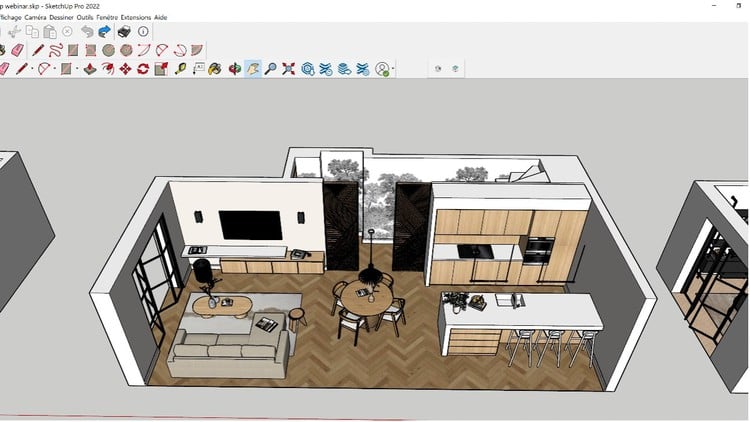
Simple Steps to Building Stunning 3D Models with SketchUp 2023
⏱️ Length: 3.6 total hours
⭐ 4.37/5 rating
👥 40,647 students
🔄 January 2024 update
Add-On Information:
Note➛ Make sure your 𝐔𝐝𝐞𝐦𝐲 cart has only this course you're going to enroll it now, Remove all other courses from the 𝐔𝐝𝐞𝐦𝐲 cart before Enrolling!
-
Course Overview
- This intensive A-Z course is meticulously designed to transform you from a SketchUp novice into a confident 3D modeling expert using the powerful SketchUp 2023.
- Dive deep into a practical, hands-on learning journey that demystifies the entire 3D modeling process for aspiring designers, architects, and creative professionals.
- Perfectly suited for anyone eager to visualize ideas in three dimensions, from product developers to game asset creators.
- Benefit from an updated curriculum, incorporating latest features and optimal workflows specifically for SketchUp 2023, ensuring you learn the most current and relevant techniques.
- Experience a logically structured progression that builds foundational knowledge step-by-step, gradually introducing advanced methodologies without feeling overwhelming.
- Emphasis is placed on developing efficient modeling habits and best practices for creating clean, organized, and high-performance 3D models.
- Engage with project-based learning modules, allowing you to immediately apply newly acquired skills to realistic design challenges, solidifying your understanding and building a practical portfolio.
-
Requirements / Prerequisites
- No prior SketchUp experience is necessary: This course is crafted for absolute beginners, providing all essential knowledge from the ground up for a smooth learning curve.
- A personal computer: Ensure your system meets minimum specifications to comfortably run SketchUp 2023 without performance issues.
- Access to SketchUp 2023 software: Whether you utilize a free trial, an educational license, or a commercial subscription, having the software installed is crucial for hands-on practice sessions.
- Basic computer literacy: Familiarity with navigating operating systems, managing files, and installing applications will significantly facilitate a smooth learning experience.
- Reliable internet connection: Required for streaming high-quality course content, downloading supplementary resources, and accessing the extensive 3D Warehouse.
- A 3-button mouse with a scroll wheel: Highly recommended for intuitive and efficient navigation within the dynamic 3D environment, greatly enhancing productivity.
- An open mind and eagerness to learn: Your enthusiasm and commitment will be your greatest assets in successfully mastering the intricacies of 3D modeling.
-
Skills Covered / Tools Used
- Precision Drawing & Object Manipulation: Master advanced drawing techniques including precise line work, complex arcs, and freehand sketching. Learn exact object placement using inference locking, guide lines, and measurement inputs for unparalleled accuracy.
- Advanced Grouping and Component Management: Effectively organize your models using nested groups and dynamic components. Improve model stability, scalability, and reusability, essential for complex and collaborative projects.
- Leveraging the 3D Warehouse and Custom Libraries: Discover efficient scene population using SketchUp’s extensive online 3D Warehouse. Develop robust strategies for creating and managing your own bespoke component libraries, saving immense time.
- Mastering Solid Tools for Complex Geometries: Explore the transformative power of SketchUp’s Solid Tools (Union, Subtract, Trim, Intersect, Split) to perform advanced Boolean operations. Rapidly create intricate and precise forms from simpler primitive shapes.
- Creating and Managing Scenes for Presentation and Animation: Develop expert skills in setting up various scenes within your model. Each scene can have unique camera angles, visual styles, and shadow settings, ideal for crafting compelling walkthroughs or professional presentation layouts.
- Customizing Visual Styles and Watermarks: Understand how to apply and create personalized visual styles for your models, ranging from architectural blueprints to artistic concept art. Learn to integrate watermarks for branding or informational purposes.
- Generating Section Cuts and Documentation Views: Proficiently use section planes to create interior views, architectural elevations, and precise cross-sections, vital for detailed technical documentation and clearer design communication.
- Adding Dimensions and Professional Annotations: Gain proficiency in accurately dimensioning your models and adding text annotations and labels directly within SketchUp, transforming your 3D work into informative construction or presentation drawings.
- Introduction to Extension Workflow: Understand the concept of SketchUp Extensions (plugins) and how they can significantly expand SketchUp’s native capabilities, enabling specialized tasks from complex geometry generation to advanced data reporting.
- Geo-location and Site Modeling: Learn to accurately place your models within real-world contexts using geo-location features. Import terrain data and satellite imagery to create realistic and contextually rich site models.
- Optimizing Model Performance: Discover crucial techniques for maintaining lean and efficient SketchUp files. This includes purging unused elements, optimizing textures, and managing polygon count for smooth performance, even with large, detailed models.
- Effective Exporting and Interoperability: Prepare your models for diverse outputs, including high-resolution 2D image exports, various 3D file formats for other CAD or rendering software, and considerations for 3D printing workflows.
-
Benefits / Outcomes
- Professional 3D Visualization Capabilities: You will be able to confidently translate abstract ideas, 2D sketches, and client briefs into accurate, detailed, and visually engaging 3D models ready for presentation.
- Enhanced Design Communication: Master the ability to present your designs with unparalleled clarity and impact, effectively conveying spatial relationships, material choices, and aesthetic intentions to clients and stakeholders.
- Accelerated Design Iteration: Gain the skills to quickly modify, refine, and experiment with design alternatives in 3D, significantly speeding up your design process and facilitating rapid integration of feedback.
- Foundational Skillset for Diverse Industries: Equip yourself with a versatile skill set highly applicable across a wide array of fields, from architectural visualization and interior design to stage set design, urban planning, and product prototyping.
- A Solid Portfolio of 3D Work: By actively engaging with practical projects throughout the course, you will build a tangible and impressive portfolio showcasing your proficiency in SketchUp modeling.
- Confidence in Tackling Complex Projects: Develop the expertise, strategic thinking, and problem-solving abilities required to approach and successfully execute even the most challenging 3D modeling tasks.
- Streamlined Workflow Efficiency: Adopt industry-standard best practices for model organization, precision, and performance optimization, making your entire design process more efficient, professional, and reliable.
- Empowerment for Creative Expression: Unleash your full creative potential by acquiring the comprehensive tools and knowledge to bring virtually any conceptual design into a detailed and presentable 3D reality.
- Gateway to Advanced Visualization: Establish a strong basis for exploring more advanced rendering engines, virtual reality (VR) applications, and other specialized 3D software integrations, expanding your future capabilities.
-
PROS
- Comprehensive A-Z structure: This course delivers a complete end-to-end learning path, meticulously covering SketchUp 2023 from foundational principles to advanced techniques, ensuring a thorough and holistic understanding.
- Practical, project-based learning: Emphasizes hands-on application through engaging, real-world projects, allowing learners to immediately reinforce theoretical knowledge and build invaluable practical experience.
- Up-to-date with SketchUp 2023: Ensures all instruction aligns precisely with the latest version of the software, teaching the most current features, interface elements, and efficient workflows for modern design.
- High student satisfaction (4.37/5 rating): A testament to the course’s exceptional quality, effective instructional methodology, and valuable content, as evidenced by thousands of positive student reviews.
- Massive student community (40,647 students): Indicates a highly popular and reputable course, offering the potential for peer learning, community support, and a strong track record of successful outcomes.
- Concise length (3.6 total hours): Offers an incredibly efficient learning experience that delivers a vast amount of crucial information without unnecessary fluff, ideal for busy individuals seeking rapid skill acquisition.
- Accessible for all skill levels: Expertly designed to cater to absolute beginners by guiding them through complex topics, while also providing enough depth to challenge and educate intermediate users seeking to solidify their fundamentals.
- Focus on industry best practices: Teaches not just how to use SketchUp’s tools, but how to use them smartly and efficiently, preparing students for professional design environments and collaborative projects.
- Strong foundation for diverse applications: The robust skills acquired are highly transferable and applicable across numerous creative and technical fields, significantly broadening career and project opportunities.
-
CONS
- Limited deep dive into advanced, third-party rendering plugins: While rendering basics are comprehensively covered, achieving ultra-realistic results with dedicated professional rendering engines may necessitate further specialized supplementary study.
Learning Tracks: English,Design,Design Tools
Found It Free? Share It Fast!