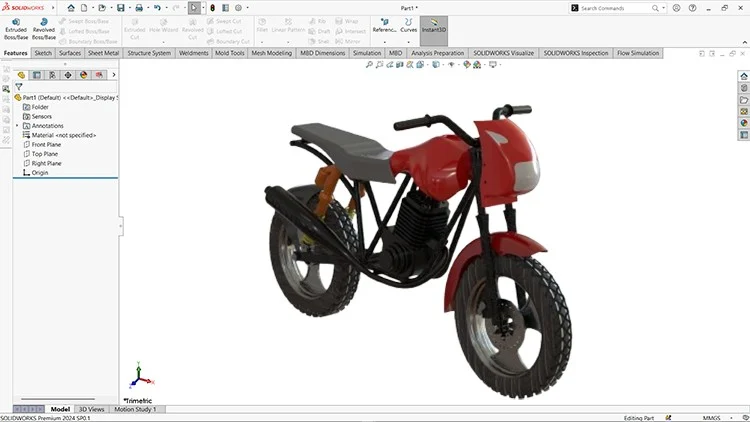
From Basics to Pro Design
⏱️ Length: 8.0 total hours
⭐ 4.33/5 rating
👥 11,662 students
🔄 April 2025 update
Add-On Information:
Note➛ Make sure your 𝐔𝐝𝐞𝐦𝐲 cart has only this course you're going to enroll it now, Remove all other courses from the 𝐔𝐝𝐞𝐦𝐲 cart before Enrolling!
-
Course Overview
- Welcome to ‘Mastering SOLIDWORKS (2024-25): A Complete Course’, your definitive pathway to becoming proficient in the industry-leading 3D CAD software. This meticulously crafted program, boasting a high 4.33/5 rating from over 11,662 students, is designed to take you on a comprehensive journey from the foundational principles of SOLIDWORKS to advanced professional design techniques. Updated for April 2025, this course ensures you’re learning the most current tools and best practices. Across 8.0 focused hours, you will engage with a project-centric curriculum that emphasizes hands-on application, moving beyond theoretical concepts to practical, real-world problem-solving. We delve into creating intricate parts, assembling complex designs, and generating professional engineering drawings that meet industry standards. Whether you’re an aspiring engineer, a design enthusiast, or a professional looking to upgrade your skillset, this course provides a robust framework for conceptualizing, modeling, and validating your designs within the SOLIDWORKS environment. Our goal is to empower you with the confidence and capability to tackle any design challenge, making you a highly effective and sought-after SOLIDWORKS user in today’s competitive landscape.
-
Requirements / Prerequisites
- Basic Computer Literacy: Familiarity with operating a personal computer, including file management, basic navigation, and common software applications.
- Access to SOLIDWORKS Software: You will need a working installation of SOLIDWORKS (preferably 2024 or 2025 version) on your computer to follow along with the exercises and practical demonstrations. A student license or trial version is sufficient.
- Stable Internet Connection: Essential for accessing course materials, following video lectures, and downloading any necessary resources.
- Enthusiasm for Learning: A strong willingness to learn, experiment, and apply new concepts is crucial for maximizing your learning outcomes.
- No Prior SOLIDWORKS Experience Required: This course is specifically structured to cater to absolute beginners, starting with fundamental concepts and progressively building towards advanced topics, ensuring everyone can follow along regardless of their initial skill level.
-
Skills Covered / Tools Used
- Advanced Part Modeling: Master techniques such as multi-body design, advanced feature creation (e.g., dome, wrap, freeform), utilizing sketch pictures, and employing various surface modeling tools for organic shapes.
- Complex Assembly Management: Learn to create intelligent assemblies using advanced mates (e.g., profile center, width, path mate), explore Smart Components, utilize assembly features like hole series and cuts, and manage large assemblies efficiently.
- Professional Drawing Creation: Develop proficiency in generating detailed engineering drawings, including custom title blocks, advanced dimensioning techniques, geometric tolerancing (GD&T) principles, and creating section, broken-out section, and auxiliary views.
- Sheet Metal Design: Understand the fundamentals of sheet metal, including creating base flanges, bends, hems, jogs, and working with flatten patterns for manufacturing.
- Weldment Structures: Gain expertise in designing welded structures using structural members, corner treatments, gussets, and end caps, along with generating cut lists for production.
- Configuration & Design Tables: Learn to create multiple configurations of parts and assemblies using design tables, effectively managing different versions and variations of your designs from a single file.
- Surface Modeling Fundamentals: Introduction to creating complex, free-form shapes using surfacing tools such as Extruded Surface, Revolved Surface, Sweep Surface, Lofted Surface, Boundary Surface, and Knit Surface.
- Simulation Express & Basic Analysis: An introductory overview of using SOLIDWORKS Simulation Express for basic stress analysis, understanding fixture and load application, and interpreting results to validate design integrity.
- File Management & Collaboration: Best practices for organizing SOLIDWORKS files, understanding external references, and preparing models for collaborative environments or product data management (PDM) systems.
- Toolbox & Standard Libraries: Efficiently utilize the SOLIDWORKS Toolbox for standard hardware components and understand how to integrate custom libraries for streamlined design.
-
Benefits / Outcomes
- Achieve SOLIDWORKS Proficiency: Gain comprehensive mastery of SOLIDWORKS, enabling you to confidently tackle a wide range of design challenges from conceptualization to detailed documentation.
- Develop Advanced Design Skills: Cultivate the ability to create intricate 3D models, complex assemblies, and sophisticated mechanical designs, showcasing a high level of technical expertise.
- Produce Industry-Standard Documentation: Master the creation of professional engineering drawings, complete with accurate dimensions, annotations, and Bill of Materials, essential for manufacturing and communication.
- Boost Career Opportunities: Enhance your resume and portfolio with demonstrable SOLIDWORKS skills, opening doors to roles in mechanical engineering, product design, manufacturing, and industrial design.
- Streamline Design Workflows: Learn efficient modeling techniques, smart feature usage, and effective assembly management, significantly reducing design time and improving productivity.
- Prepare for Certification: Build a strong foundation that can serve as excellent preparation for SOLIDWORKS professional certification exams (CSWA, CSWP), validating your expertise to potential employers.
- Problem-Solving Confidence: Develop an intuitive understanding of how to approach and solve real-world design problems using the versatile tools within SOLIDWORKS.
- Creative Design Expression: Unleash your creativity by having a robust toolset to accurately translate your innovative ideas into tangible 3D models and functional designs.
-
PROS
- Comprehensive & Up-to-Date: Covers material from “Basics to Pro Design” with a timely “April 2025 update,” ensuring relevance and modern techniques.
- Highly Rated by Peers: An excellent 4.33/5 rating from a large student base (11,662 students) speaks to its quality and effectiveness.
- Efficient Learning Curve: The 8.0 total hours suggest a focused, impactful curriculum that gets straight to the point without unnecessary fluff.
- Practical Application Focus: Emphasizes hands-on learning, enabling students to apply theoretical knowledge to real-world design scenarios.
- Strong Foundation for Career Growth: Provides essential skills highly valued in engineering and design fields, enhancing employability and professional development.
- Versatile Skill Development: Covers a broad spectrum of SOLIDWORKS capabilities, equipping learners to handle diverse design projects.
-
CONS
- Intensive Pace for Absolute Beginners: While comprehensive, the 8-hour duration might feel fast-paced for individuals completely new to CAD, potentially requiring additional self-study and practice time beyond the course.
Learning Tracks: English,Design,Design Tools
Found It Free? Share It Fast!