From Basics to Pro Design
⏱️ Length: 8.0 total hours
⭐ 4.20/5 rating
👥 9,712 students
🔄 April 2025 update
Add-On Information:
Note➛ Make sure your 𝐔𝐝𝐞𝐦𝐲 cart has only this course you're going to enroll it now, Remove all other courses from the 𝐔𝐝𝐞𝐦𝐲 cart before Enrolling!
-
Course Overview
- This comprehensive course is meticulously updated for the SOLIDWORKS 2024-25 release, focusing on not just learning tools but mastering design thinking and efficient workflows.
- It goes beyond individual features, emphasizing the critical role of design intent from initial concept sketches to final manufacturing documentation.
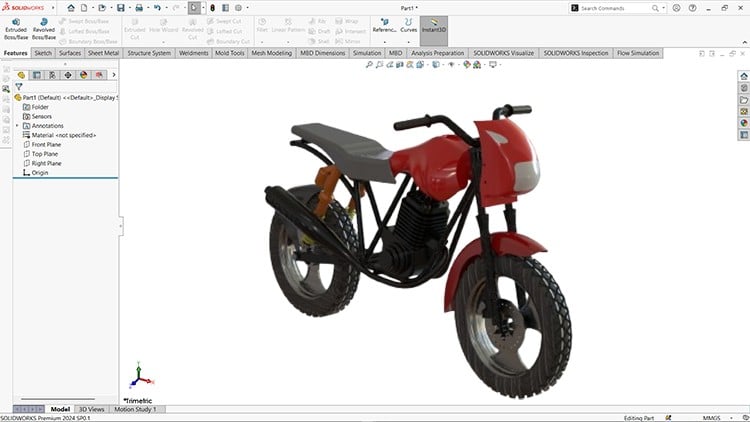
- Adopt a practical, project-centric methodology, using a detailed bike assembly project to cohesively demonstrate inter-module integration and real-world application.
- Explore the power of parametric design principles, enabling you to create flexible, easily modifiable models that adapt to design changes with minimal effort.
- Gain insights into managing complex projects and leveraging reusable component libraries for increased productivity and standardization.
- Understand the holistic SOLIDWORKS ecosystem, appreciating how various design environments seamlessly connect to streamline your product development cycle.
- Learn to construct robust, error-resistant models and assemblies, reducing downstream issues and enhancing overall design quality.
-
Requirements / Prerequisites
- Basic Computer Literacy: Familiarity with the Windows operating system and general file management.
- System Specifications: Access to a computer meeting SOLIDWORKS 2024-25 system requirements (e.g., sufficient RAM, dedicated graphics card for optimal performance).
- SOLIDWORKS Software: An installed and licensed copy of SOLIDWORKS (Student Edition, Trial, or Commercial version 2024 or 2025).
- Curiosity & Analytical Thinking: A proactive approach to problem-solving and a willingness to explore complex engineering challenges.
- No Prior CAD Experience: The course is structured to be accessible for absolute beginners, providing a thorough foundation.
- Stable Internet Connection: Required for accessing course materials, updates, and supplementary resources.
- Dedicated Practice Time: Readiness to engage in hands-on exercises and practice lessons beyond the core video content.
-
Skills Covered / Tools Used
- Design Strategy & Planning: Cultivating a systematic approach to break down complex projects into manageable, efficient design workflows.
- Feature-Based Modeling Techniques: Mastering robust 3D model creation using advanced features like lofts, sweeps, and complex patterning for intricate geometries.
- Configuration Management: Learning to generate multiple design variations within a single file, optimizing time and simplifying modifications.
- Advanced Selection & Manipulation: Developing proficiency in efficient selection methods and direct editing techniques for complex geometry and assemblies.
- Design Table Integration: Leveraging Excel-driven design tables to automate the rapid creation of component families and iterative designs.
- Material Properties & Analysis: Applying realistic material assignments and performing basic mass, center of gravity, and inertia calculations for engineering insights.
- Custom Drawing Templates: Setting up personalized drawing sheets, title blocks, and standard views for professional, consistent technical documentation.
- Exploded Views & Bill of Materials (BOM): Generating clear exploded assembly sequences and automatically extracting accurate BOMs for manufacturing and procurement.
- Proactive Collision Detection: Implementing robust methods to identify and resolve potential component interferences early in the design cycle.
- In-Context Design Methodologies: Creating and modifying parts directly within an assembly to maintain crucial design intent and inter-component relationships.
- Productivity Enhancements: Customizing keyboard shortcuts, mouse gestures, and user interface for accelerated design processes.
- Effective File Management: Understanding best practices for organizing SOLIDWORKS files, managing external references, and using ‘Pack and Go’ for project portability.
- Surface Feature Application: Strategic deployment of surfacing techniques for creating organic, aesthetically driven, or complex free-form geometries.
- Weldment Profile Customization: Building and utilizing custom structural member profiles to streamline the design of welded frames and structures.
-
Benefits / Outcomes
- Industry-Ready Portfolio Piece: Successfully complete a comprehensive bike assembly, providing a tangible, impressive project for your professional portfolio.
- Enhanced Problem-Solving Abilities: Develop a structured and analytical approach to design challenges, leading to more innovative and efficient engineering solutions.
- Significant Design Efficiency: Master advanced techniques, shortcuts, and best practices that dramatically reduce design time and improve overall productivity.
- Foundation for Certification: Establish a strong knowledge base and practical skills essential for pursuing official SOLIDWORKS certifications (e.g., CSWA, CSWP).
- Career Advancement Opportunities: Equip yourself for roles in mechanical design, product development, manufacturing engineering, and specialized CAD positions.
- Confident Interpretation of Technical Drawings: Gain the ability to expertly read, understand, and critically evaluate complex engineering drawings and documentation.
- Seamless Collaborative Design: Understand principles and practices that facilitate effective teamwork and data exchange in multi-user design projects.
- Accelerated Innovation Cycle: Leverage parametric modeling to quickly prototype, test, and iterate on designs, fostering a faster pace of innovation.
-
PROS
- Current & Relevant: Fully updated to reflect the latest SOLIDWORKS 2024-25 features and industry best practices.
- Project-Based Learning: Strengthens understanding through a engaging, real-world bike assembly project from start to finish.
- Holistic Skill Development: Covers a wide array of SOLIDWORKS modules, ensuring a well-rounded foundation for professional use.
- Efficient Workflows: Emphasizes productivity tips, shortcuts, and strategic approaches to optimize your design process.
- Accessibility: Designed to guide learners from fundamental concepts to advanced applications, suitable for various experience levels.
- Strong Foundational Knowledge: Builds a robust base for future advanced SOLIDWORKS specializations or certifications.
-
CONS
- Practice-Intensive: While comprehensive, true mastery requires significant hands-on practice beyond the 8 hours of core content.
Learning Tracks: English,Design,Design Tools
Found It Free? Share It Fast!