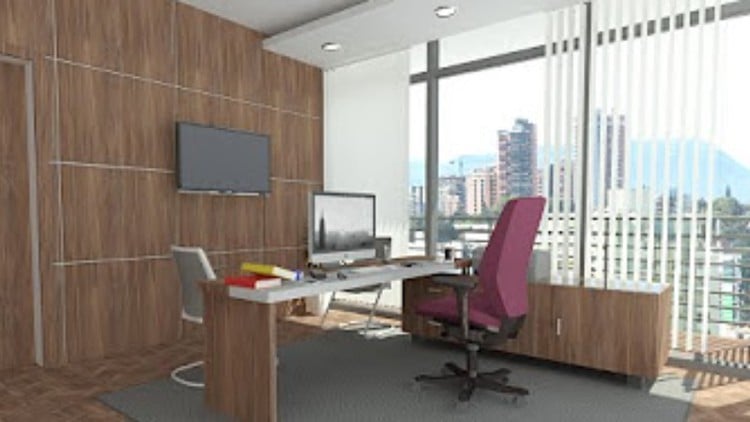
Follow Complete Step by Step instructions to become from Beginner to Pro Level in Modeling & Rendering Interior Office
⏱️ Length: 6.7 total hours
⭐ 4.24/5 rating
👥 15,509 students
🔄 January 2025 update
Add-On Information:
Note➛ Make sure your 𝐔𝐝𝐞𝐦𝐲 cart has only this course you're going to enroll it now, Remove all other courses from the 𝐔𝐝𝐞𝐦𝐲 cart before Enrolling!
- Course Overview
- Embark on a comprehensive journey to transform your design visualization skills through practical, project-based learning in Autodesk Revit. This course is meticulously crafted to guide you from foundational understanding to advanced proficiency in modeling and rendering interior office spaces.
- Leverage the power of real-world project scenarios to solidify your comprehension and develop the confidence to tackle complex design challenges. Each module is designed to build upon the last, ensuring a seamless progression of your expertise.
- Experience a dynamic learning environment that prioritizes hands-on application, allowing you to translate theoretical knowledge into tangible, professional-quality design outcomes.
- Discover efficient workflows and best practices adopted by industry professionals, preparing you to excel in demanding architectural and interior design environments.
- The January 2025 update ensures you are learning with the latest interface and functionalities, keeping your skills sharp and relevant.
- Requirements / Prerequisites
- A stable internet connection is essential for accessing course materials and engaging with the learning platform.
- A working installation of Autodesk Revit is required to follow along with the project demonstrations and exercises.
- Basic computer literacy and familiarity with Windows or macOS operating systems are assumed.
- An interest in interior design and a desire to master digital design tools are highly recommended to maximize learning potential.
- No prior Revit experience is necessary; the course is designed to accommodate absolute beginners.
- Skills Covered / Tools Used
- Spatial Organization & Layout: Develop a keen eye for effective space planning, creating functional and aesthetically pleasing office layouts.
- Material & Finish Application: Learn to accurately represent diverse materials and finishes, bringing realism to your virtual designs.
- Lighting Simulation & Effects: Master the art of illuminating spaces effectively, understanding how light impacts ambiance and perception.
- Detailing & Annotation: Understand the nuances of adding essential details and annotations for clear design communication.
- Rendering Engine Utilization: Gain proficiency in operating rendering engines to produce photorealistic visuals.
- Camera Composition Techniques: Explore principles of photography to frame your designs in compelling and impactful ways.
- Parametric Object Manipulation: Understand the underlying principles of how families are constructed and how to modify them.
- Workflow Optimization: Discover strategies for streamlining your design process within Revit for greater efficiency.
- Project Management Fundamentals (Revit Context): Learn to organize and manage your design projects effectively within the Revit environment.
- Visual Communication Strategy: Develop the ability to convey design intent clearly and persuasively through rendered imagery.
- Autodesk Revit (Core Software): The primary platform for all modeling, documentation, and rendering tasks.
- Integrated Rendering Tools (or similar): Utilizing Revit’s built-in rendering capabilities or compatible plugins.
- Benefits / Outcomes
- Become a proficient Revit user capable of independently modeling and rendering intricate interior office spaces.
- Significantly enhance your portfolio with a collection of high-quality, project-based renderings.
- Gain a competitive edge in the job market by demonstrating specialized skills in BIM for interior design.
- Improve your ability to communicate design ideas to clients and stakeholders through compelling visuals.
- Develop a deeper understanding of the relationship between form, material, and light in interior environments.
- Increase your productivity and efficiency in the design process.
- Acquire a foundational skill set that can be applied to a wide range of architectural and interior design projects.
- Build the confidence to take on more challenging and ambitious design endeavors.
- Earn a certificate of completion, validating your newly acquired expertise.
- Be prepared to contribute meaningfully to design teams from day one.
- PROS
- Project-Driven Learning: Highly effective for practical skill acquisition and real-world application.
- Beginner-Friendly Approach: Accessible to individuals with no prior Revit experience.
- Comprehensive Coverage: Addresses both modeling and rendering aspects essential for interior design.
- Valuable Skill Development: Equips learners with in-demand industry skills.
- Latest Updates: Ensures content is current and reflects recent software enhancements.
- CONS
- Focus on Interior Office Spaces: While versatile, the project examples are specifically centered on office environments, potentially requiring further adaptation for vastly different project types.
Learning Tracks: Hindi,Design,Architectural Design
Found It Free? Share It Fast!