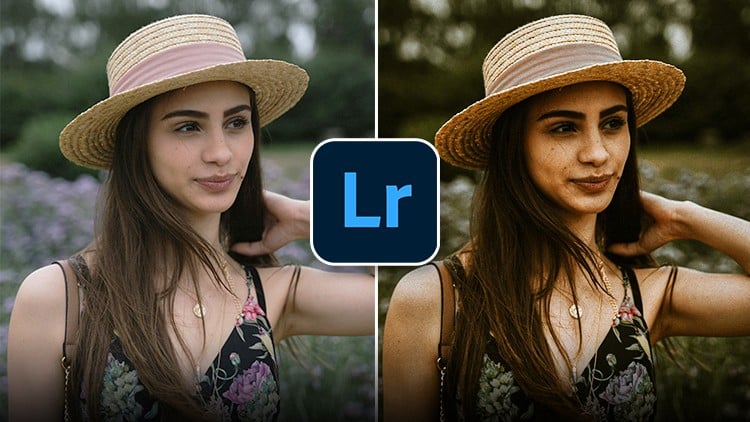
Master Adobe Lightroom Mobile and learn photo editing, color correction, and color grading using just your phone!
⏱️ Length: 1.4 total hours
⭐ 3.83/5 rating
👥 831 students
🔄 November 2025 update
Add-On Information:
Note➛ Make sure your 𝐔𝐝𝐞𝐦𝐲 cart has only this course you're going to enroll it now, Remove all other courses from the 𝐔𝐝𝐞𝐦𝐲 cart before Enrolling!
-
Course Overview
- This masterclass is meticulously designed for anyone eager to unlock the full potential of their smartphone photography, transforming everyday snapshots into captivating works of art using the powerful Adobe Lightroom Mobile application.
- Dive into a world where professional-grade photo editing is accessible directly from your pocket, enabling you to refine, enhance, and stylize your images on the go, without the need for complex desktop software or expensive camera gear.
- Explore a comprehensive journey from understanding basic image adjustments to executing advanced color grading techniques, ensuring every photo you take resonates with impact and visual appeal.
- Learn the foundational principles of visual storytelling through image manipulation, gaining the skills to evoke specific moods and atmospheres that elevate your mobile photography beyond mere documentation.
- Perfect for social media enthusiasts, aspiring content creators, travel photographers, or anyone simply looking to improve their personal photo collection, this course empowers you to produce consistently high-quality visuals.
- The curriculum emphasizes a practical, results-oriented approach, providing clear demonstrations and actionable strategies that you can immediately apply to your own photo library.
- Discover how to cultivate a unique visual style, allowing your personality and artistic vision to shine through your edits, whether you prefer vibrant, muted, dramatic, or minimalist aesthetics.
- This course serves as your definitive guide to mastering mobile photo enhancement, making sophisticated editing techniques intuitive and achievable for all skill levels.
-
Requirements / Prerequisites
- A Smartphone or Tablet: An iOS or Android device capable of running the Adobe Lightroom Mobile application efficiently.
- Adobe Lightroom Mobile App: Access to the free version of Adobe Lightroom Mobile is sufficient, though a premium subscription (optional) can unlock additional cloud features.
- No Prior Editing Experience: This course is structured to guide absolute beginners through the entire editing process, assuming no previous knowledge of Lightroom or photo manipulation.
- A Desire to Learn: Enthusiasm for mobile photography and a willingness to experiment with editing tools are the primary requirements for success.
- Basic Device Familiarity: Comfort with navigating your smartphone’s interface and basic file management is helpful but not strictly necessary.
- Internet Connection: Needed for downloading the app and accessing course materials, though editing can often be done offline.
-
Skills Covered / Tools Used
- Mastering Exposure & Contrast: Learn to precisely control the brightness and dynamic range of your photos, bringing out details in both highlights and shadows to create visually balanced images.
- Fine-tuning Highlights & Shadows: Gain expertise in individually adjusting the brightest and darkest areas of your image to recover lost detail or add dramatic flair.
- Utilizing Whites & Blacks: Discover how to set the true white and black points in your photos for optimal contrast and punch, ensuring a clean and professional appearance.
- Applying Presence Tools: Skillfully use Clarity to enhance mid-tone contrast, Texture to refine surface details, and Dehaze to remove atmospheric fog or add depth to landscapes.
- Executing Tone Curve Adjustments: Gain command over the powerful Tone Curve for granular control over tonal ranges, allowing for precise adjustments to contrast and color across your image.
- Harnessing HSL (Hue, Saturation, Luminance): Learn to selectively adjust individual color channels, enabling you to modify specific colors without affecting others, for targeted enhancements or creative color shifts.
- Employing Color Grading: Delve into advanced color manipulation by adding specific color tones to your shadows, midtones, and highlights, creating sophisticated cinematic or thematic looks.
- Implementing Sharpening & Noise Reduction: Optimize image detail and minimize unwanted digital noise, achieving crisp, clean photos even in challenging lighting conditions.
- Correcting Lens Distortions: Understand how to automatically or manually correct common lens imperfections like chromatic aberration and perspective distortions directly within the app.
- Working with Vignette & Grain: Learn to artistically apply vignetting for subject emphasis and add subtle film grain for a classic, analog aesthetic.
- Utilizing Local Adjustments (Radial & Linear Gradients, Brush Tool): Master the art of selective editing, applying precise adjustments to specific areas of your photo without affecting the entire image.
- Efficient Spot Removal: Employ the healing brush to seamlessly remove unwanted elements, blemishes, or distractions from your photographs.
- Creating and Applying Custom Presets: Develop your own unique editing styles and save them as presets for consistent application across multiple photos, streamlining your workflow significantly.
- Strategic Cropping and Straightening: Learn to compose your images effectively by cropping for impact and straightening horizons for a polished finish.
- Effective Photo Organization: Understand basic techniques for importing, sorting, and managing your photo library within Lightroom Mobile for an organized editing workflow.
- Optimal Export Settings: Discover best practices for exporting your edited photos for various uses, including social media, web, and sharing, ensuring quality and appropriate file sizes.
-
Benefits / Outcomes
- Achieve Professional-Quality Edits: Consistently produce stunning, high-impact images that rival those edited on desktop software, all from your mobile device.
- Develop a Unique Editing Style: Cultivate your own distinctive visual aesthetic, allowing your photos to reflect your personal brand or artistic vision consistently.
- Boost Your Social Media Presence: Elevate your content with polished, engaging visuals that attract more attention and engagement from your audience.
- Save Time with Efficient Workflows: Master quick editing techniques and preset creation to significantly speed up your post-processing, making mobile editing a seamless part of your daily routine.
- Enhance Personal Photo Collections: Transform everyday memories into beautifully crafted images, creating a more visually appealing personal archive.
- Gain Creative Confidence: Feel empowered to experiment with various editing styles and tools, trusting your judgment to make impactful visual decisions.
- Understand Image Mechanics: Develop a deeper comprehension of how light, color, and composition interact in an image, improving your photographic eye even before editing.
- Portable Editing Power: Enjoy the freedom to edit your photos anywhere, anytime, turning travel time or waiting periods into productive creative sessions.
- Cost-Effective Solution: Leverage the free capabilities of Lightroom Mobile to achieve professional results without investing in expensive software or computer hardware.
- Storytelling Through Imagery: Learn to manipulate images to convey specific emotions, narratives, and atmospheres, making your photos more resonant and impactful.
-
PROS
- Highly Practical and Actionable: The course focuses on immediate application, allowing students to practice and implement learned techniques on their own photos from day one.
- Accessibility and Convenience: Learning to edit entirely on a mobile device means you can develop valuable skills without needing a powerful computer or dedicated studio setup.
- Concise and Efficient Learning: With a total length of just 1.4 hours, the course is designed for busy individuals seeking to acquire essential skills quickly and effectively.
- Cost-Effective Skill Development: Utilizes the widely available (and free base version) Lightroom Mobile app, making professional-grade photo editing accessible to everyone.
- Instructor-Led Guidance: Benefit from step-by-step instructions and expert demonstrations that simplify complex editing concepts into easy-to-understand modules.
- Real-World Relevance: Emphasizes techniques and styles popular in current mobile photography and social media, ensuring the skills you learn are immediately useful.
- Flexibility of Learning: Study at your own pace and revisit lessons as needed, fitting learning into your schedule seamlessly.
-
CONS
- The condensed format and mobile-first approach may not cover the extensive depth or all advanced features available in the desktop version of Adobe Lightroom Classic.
Learning Tracks: English,Design,Graphic Design & Illustration
Found It Free? Share It Fast!