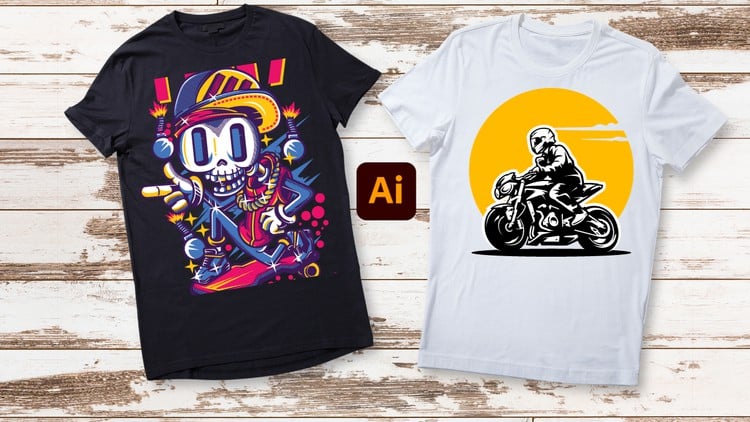
Unleash Your Creativity: From Beginner Brushstrokes to Expert Masterpieces – T-Shirt Design in Adobe Illustrator
⏱️ Length: 4.4 total hours
⭐ 4.24/5 rating
👥 18,670 students
🔄 November 2023 update
Add-On Information:
Note➛ Make sure your 𝐔𝐝𝐞𝐦𝐲 cart has only this course you're going to enroll it now, Remove all other courses from the 𝐔𝐝𝐞𝐦𝐲 cart before Enrolling!
- Course Overview
- Transform from a beginner to an expert in T-shirt design using Adobe Illustrator. This course provides a comprehensive roadmap for all aspiring apparel designers and entrepreneurs.
- Learn to translate creative visions into professional, print-ready designs, emphasizing visual impact, balance, and market appeal specifically for wearable art.
- Master Adobe Illustrator, the industry-standard vector tool, for creating scalable, versatile, and impactful T-shirt graphics with both technical precision and design flair.
- Engage in practical, project-based learning, applying techniques immediately to real-world T-shirt challenges, developing an iterative process from concept to final product.
- Requirements / Prerequisites
- A computer capable of efficiently running Adobe Illustrator CC, with an active subscription (software not included).
- Basic computer literacy and a stable internet connection for accessing course materials.
- No prior design software experience is necessary; just an open mind and enthusiasm to learn.
- A desire to express creativity through unique visuals and build a compelling T-shirt design portfolio.
- Skills Covered / Tools Used
- Precision Vector Creation: Master the Pen Tool for flawless curves and lines, fundamental for all vector illustrations and advanced path manipulation.
- Complex Shape Construction: Utilize the Pathfinder panel and Shape Builder Tool to efficiently create intricate designs from basic forms.
- Advanced Typography: Go beyond font selection to master styling, warping, outlining for print, and applying effects tailored for apparel aesthetics.
- Non-Destructive Workflow: Leverage the Appearance Panel for flexible, iterative design changes, applying multiple attributes without altering objects.
- Applied Color Theory: Understand color psychology and create effective, print-ready palettes using global swatches and color groups.
- Custom Asset Development: Design unique brushes and create reusable symbols to streamline workflows and maintain visual consistency.
- Efficient Organization: Implement best practices for layer management, ensuring complex designs are editable, organized, and print-shop friendly.
- Image Integration Techniques: Master clipping masks for precise image cropping and experiment with blending modes for unique visual effects.
- Print-Ready Scalability: Learn vector vs. raster differences, ensuring designs maintain crispness and quality across all T-shirt sizes.
- Workflow Optimization: Discover essential keyboard shortcuts, custom workspaces, and efficient file saving strategies for maximum productivity.
- Developing Unique Styles: Explore brainstorming, moodboarding, and iterative design methods to cultivate your signature aesthetic and create original artwork.
- Multi-Artboard Management: Efficiently utilize multiple artboards to manage design variations, colorways, or mockups within a single Illustrator file.
- Commercial Print Preparation: Gain vital knowledge on print file formats, CMYK, bleed, safe zones, and effective communication with print shops for perfect production.
- Benefits / Outcomes
- Build a comprehensive portfolio of unique T-shirt designs, ready for client pitches or your own brand launch.
- Achieve high proficiency in Adobe Illustrator, applying advanced tools to diverse graphic design projects.
- Gain the capability to conceptualize, design, and prepare your own unique T-shirt lines for an independent apparel brand.
- Master technical specifications for print-ready files, ensuring high-quality output for various printing methods and minimizing errors.
- Develop a keen eye for effective composition, typography, and color harmony specifically for apparel design.
- Unlock freelance opportunities in apparel design, merchandise, or branding by leveraging expert Illustrator skills.
- Cultivate a distinct design voice and aesthetic, creating innovative and memorable T-shirt art that truly stands out.
- Acquire a systematic approach to design problem-solving, from concept to final production, for efficient and effective creative processes.
- PROS
- Comprehensive Learning: Structured path from foundational concepts to advanced techniques, suitable for all skill levels.
- High Student Satisfaction: 4.24/5 rating from 18,670 students validates proven effectiveness and positive learning.
- Up-to-Date Content: November 2023 update ensures alignment with the latest Illustrator features and best practices.
- Efficient Skill Acquisition: 4.4 hours offers rapid learning without significant time commitment.
- Practical & Project-Oriented: Focus on hands-on application to create tangible T-shirt designs and build a portfolio.
- Industry-Standard Skills: Learning Adobe Illustrator directly transfers to professional design roles and commercial projects.
- Career & E-commerce Gateway: Strong foundation for launching an online T-shirt business or freelance services.
- Creative Empowerment: Transforms personal creative ideas into marketable, high-quality products.
- CONS
- Requires a separate financial investment for an Adobe Illustrator CC subscription.
Learning Tracks: English,Design,Graphic Design & Illustration
Found It Free? Share It Fast!